Navigation system: memory points
Navigation settings
In this manual: Navigation system: memory points
~1min read
Points or areas on the map can be registered.
The registered points can be used on the “Destination” screen. (See “— Destination search by Home” on page 64, “— Destination search by Preset destinations” on page 64 and “— Destination search by “Address Book”” on page 77.) Registered areas are avoided at the time of route search.

1. Push the “SETUP” button.
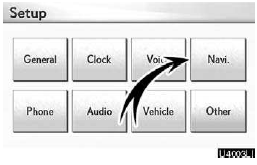
2. Touch “Navi.”.

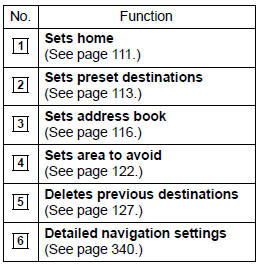
On this screen, the following operations can be performed.
Test yourself
A quick Lexus GX quiz: every answer comes with an explanation and a link to the manual page.
Was this page helpful?