Navigation system: memory points
Deleting previous destinations
In this manual: Navigation system: memory points
~1min read
The previous destination can be deleted.
1. Push the “SETUP” button.
2. Touch “Navi.” on the “Setup” screen.
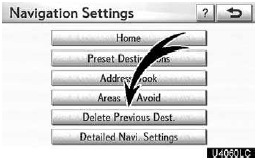
3. Touch “Delete Previous Dest.”.
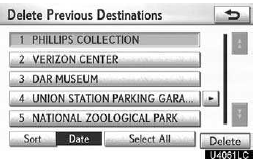
4. Touch the button you want to delete.
“Select All”: To select all previous destinations in the system.
“Unselect All”: To unselect all previous destinations in the system.
5. Touch “Delete”.

6. To delete the destination, touch “Yes”. To cancel the deletion, touch “No”.
Test yourself
A quick Lexus GX quiz: every answer comes with an explanation and a link to the manual page.
Was this page helpful?