Using the radio
- Display
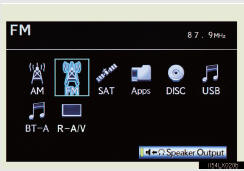
Select radio mode on the source screen to display the control screen.
- Controller

1 Selecting a preset station 2, 3 Tuning the station
Selecting a preset station/channel
Press “∧” or “∨” of the “FOL/CH” button until the desired station/ channel band appears on the screen.
Tuning the station
►Using the “TUNE” button
Press “∧” or “∨” of the “TUNE” button on the controller until the desired station/channel appears on the screen.
Press and hold “∧” or “∨” of the “TUNE” button and the stations/ channels will be searched automatically one after another.
►Using  or

Press  or
 until the desired station appears on the screen.
Press  or
 until a beep is heard. The radio will begin seeking up or down for a station/channel of the nearest frequency.
Continue to press and hold  or
 after a beep is heard and stations will be sought for automatically. When
 or
 is released the radio will seek up or down for a station/channel of the nearest frequency.
- When a different audio source is selected at the front seats
Radio mode cannot be selected at the rear seats.
Test yourself
A quick Lexus LX quiz: every answer comes with an explanation and a link to the manual page.