Interior features
Playing WMA/MP3 discs
In this manual: Interior features
~1min read
- Display
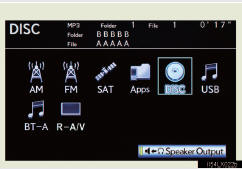
Select disc mode on the source screen to display the control screen.
- Controller
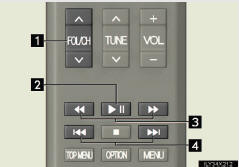
1 Selecting a folder
2 Play/pause
3 Fast forward or rewind
4 Selecting a file (press)
Fast forward or rewind (press and hold)
Selecting a file
Press  or
 until the desired file number appears on the screen.
Selecting a folder
Press “∧” or “∨” of the “FOL/CH” button until the desired folder number appears on the screen.
Fast forwarding or rewinding a file
Press  or
 , or press and hold or .
Playing or pausing a file
Press  .
Test yourself
A quick Lexus LX quiz: every answer comes with an explanation and a link to the manual page.
Was this page helpful?