Route guidance screen
During route guidance, various types of guidance screens can be displayed de- pending on conditions.
SCREEN LAYOUT
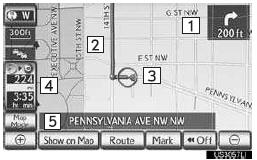
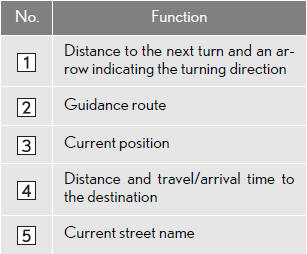
INFORMATION
● If the vehicle goes off the guidance route, the route is searched again.
● For some areas, the roads have not been completely digitized in our database. For this reason, the route guidance may select a road that should not be traveled on.
●When arriving at the set destination the destination name will be displayed on the top of the screen. Touching “Off” clears the display.
DURING FREEWAY DRIVING
During freeway driving, the freeway exit information screen will be displayed.
This screen displays the distance to the next junction/exit, or POIs in the vicinity of the freeway exit.
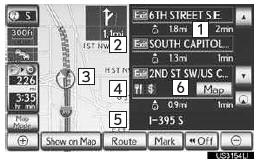
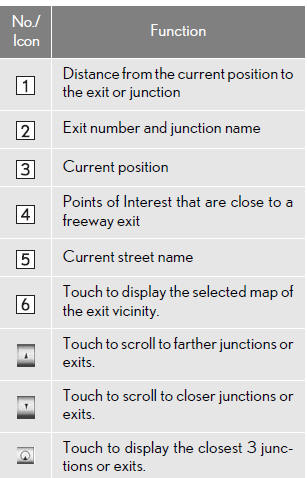
WHEN APPROACHING A FREEWAY EXIT OR JUNCTION
When the vehicle approaches an exit or junction, the freeway guidance screen will be displayed.
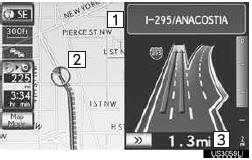
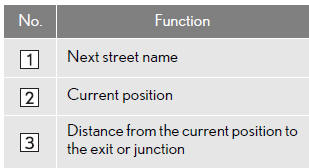
 : Touch to hide the freeway guidance screen.
• Touch “Intersection”, or press the “MAP/ VOICE” button, to change back to the freeway guidance screen.
WHEN APPROACHING AN INTERSECTION
When the vehicle approaches an inter- section, the intersection guidance screen will be displayed.
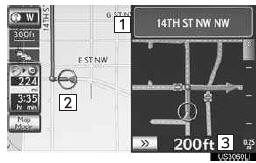
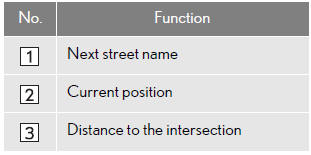
: Touch to hide the intersection guid- ance screen.
• Touch “Intersection”, or press the “MAP/ VOICE” button, to change back to the intersection guidance screen.
OTHER SCREENS
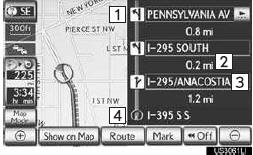
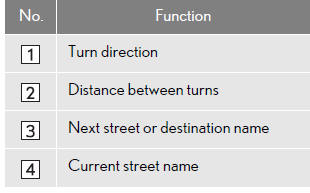
■TURN LIST SCREEN
On this screen, the list of turns on the guidance route can be viewed.
1 Touch “Turn List” during guidance to display the turn list.
■ARROW SCREEN
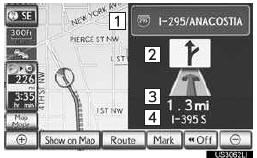
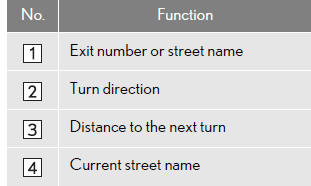
On this screen, information about the next turn on the guidance route can be viewed.
1 Touch “Turn-by-Turn Arrow” during guidance to display the arrow screen.
Test yourself
A quick Lexus LX quiz: every answer comes with an explanation and a link to the manual page.