When Driving
Active Driving Display
In this manual: When Driving
3steps
~18min
2/5difficulty
Done 0 of 3
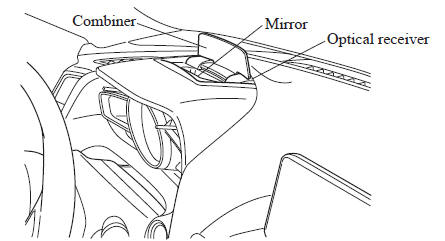
WARNING Always adjust the display brightness and position with the vehicle stopped: Adjusting the display brightness and position while driving the vehicle is dangerous as doing so could distract your attention from the road ahead and lead to an accident. CAUTION
- Do not try to adjust the angle or open/close the active driving display manually.
NOTE
- It may be difficult to view the display when wearing sunglasses. Take off your sunglasses or adjust the luminosity.
- If the battery has been removed and re-installed or the battery voltage is low, the adjusted position may deviate.
- The display may be difficult to view or temporarily affected by weather conditions such as rain, snow, light, and temperature.
- If the audio system is removed, the active driving display cannot be operated.
The active driving display indicates the following information:
- Mazda Radar Cruise Control (MRCC) Operation Conditions and Warnings Refer to Mazda Radar Cruise Control (MRCC) on .
- Lane Departure Warning System (LDWS) Operation Conditions and Warnings Refer to Lane Departure Warning System (LDWS) on .
- Smart City Brake Support (SCBS) Operation Conditions and Warnings Refer to Smart City Brake Support (SCBS) on .
- Forward Obstruction Warning (FOW) Operation Conditions and Warnings Refer to Forward Obstruction Warning (FOW) on .
- Vehicle Speed Setting Using Cruise Control Refer to Cruise Control on .
- Turn-by-Turn (TBT) (Direction and Distance) and Lane Guidance
- Vehicle Speed
Each setting/adjustment for the active driving display can be performed on the center display (Type B audio).
- Select the (
 ) icon on
the home screen and display the Settings screen. - Select the AD-Disp tab.
- Select the desired item and perform the setting/adjustment.
- Height : Active driving display position
- Brightness Control : Method for adjusting screen brightness (Automatically/Manually)
- Calibration : Brightness initialization setting (when selecting automatic adjustment)
- Brightness : Brightness adjustment (when selecting manual adjustment)
- Navigation : On/Off
- Active Driving Display : On/Off
- Reset
Test yourself
A quick Mazda 3 quiz: every answer comes with an explanation and a link to the manual page.
Was this page helpful?