Operating the Compact Disc (CD) Player
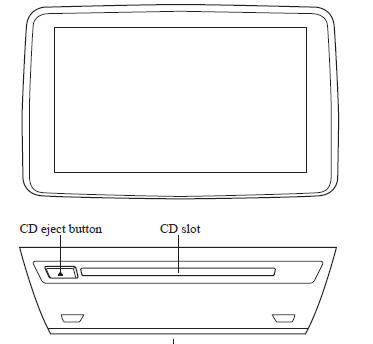
Type |
Playable data |
| Music/MP3/WMA/ AAC CD player |
|
NOTE If a disc has both music data (CD-DA) and MP3/WMA/AAC files, playback of the two or three file types differs depending on how the disc was recorded.
Inserting the CD
Insert the CD into the slot, label-side up.
The auto-loading mechanism will set the CD and begin play.
NOTE There will be a short lapse before play begins while the player reads the digital signals on the CD.
Ejecting the CD
Press the CD eject button (  ) to
eject the CD.
Playback
Select the  icon on the home
screen with a CD inserted and display the Entertainment screen. When  is selected, the
following icons are indicated in the lower part of the center display.
Icon |
Function |
 | Displays the Entertainment menu. Use to switch to a different audio source. |
 | (Music CD)Displays the track list of the CD. Select the track you want to play. (MP3/WMA/AAC CD) Displays the top level folder/file list. Select the folder you want to select. The files in the selected folder are displayed.Select the file you want to play. |
 | (MP3/WMA/ACC CDs only)Displays the file list of the folder currently being played. Select the song you want to listen to. |
 | (Music CD)Replays the song currently being played repeatedly. Select it again to cancel. (MP3/WMA/AAC CD)Replays the song currently being played repeatedly. When selected again, the songs in the folder are played repeatedly.Select it again to cancel. |
 | (Music CD)Plays songs on the CD in random order. Select it again to cancel. (MP3/WMA/AAC CD)Plays songs in the folder in random order. When selected again, the songs on the CD are played in random order.Select it again to cancel. |
 | (Music CD)The beginning of each track on a CD is played to aid in searching for a desired track. When selected again, the operation is canceled and the song currently being played continues. (MP3/WMA/AAC CD)The beginning of each track in a folder is played to aid in searching for a desired track. When selected again, the operation is canceled and the song currently being played continues. If the audio is operated during scan-play, the track being scan-played is played normally.Then, the audio operation is performed. |
| If selected within a few seconds of a song which has started to play, the previous song is selected. If more than a few seconds have elapsed after a song has begun to play, the song currently being played is replayed from the beginning. Long-press to fast reverse. It stops when you remove your hand from the icon or the commander knob. |
|
| Plays a CD. When selected again, playback is temporarily stopped. | |
| Advances to the beginning of the next song. Long-press to fast forward. It stops when you remove your hand from the icon or the commander knob. |
|
| Displays sound settings to adjust audio quality level. Refer to Volume/Display/Sound Controls on . |
Example of use (When searching for a song from the top level of an MP3/ WMA/AAC CD)
- Select the
 icon to
display the folder/file list at the top level.

- When the folder is selected, folders/file lists in the folder are displayed.
- Select the desired song.
NOTE
- Select
 to move to
a folder one level higher. - The appearance of the repeat and shuffle icons changes depending on the type of operation in which the function is used.
Test yourself
A quick Mazda 3 quiz: every answer comes with an explanation and a link to the manual page.