Interior Features
Troubleshooting
In this manual: Interior Features
~1min read
Mazda Bluetooth ® Hands-Free Customer Service
If you have any problems with Bluetooth ® , contact our toll-free customer service center.
- U.S.A.
- Canada
- Mexico
Bluetooth ® Device pairing, connection problems
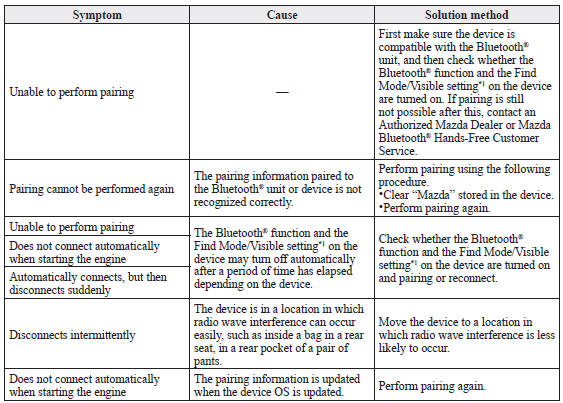
*1 Setting which detects the existence of a device external to the Bluetooth ® unit
NOTE
- When the OS of the device is updated, the pairing information may be deleted. If this happens, reprogram the pairing information to the Bluetooth ® unit.
- If you pair your phone which has already been paired to your vehicle more than once in the past, you need to delete “Mazda” on your mobile device. Then, execute the Bluetooth ® search on your mobile device once again, and pair to a newly detected “Mazda”.
- Before you pair your device, make sure that Bluetooth ® is “ON”, both on your phone and on the vehicle.
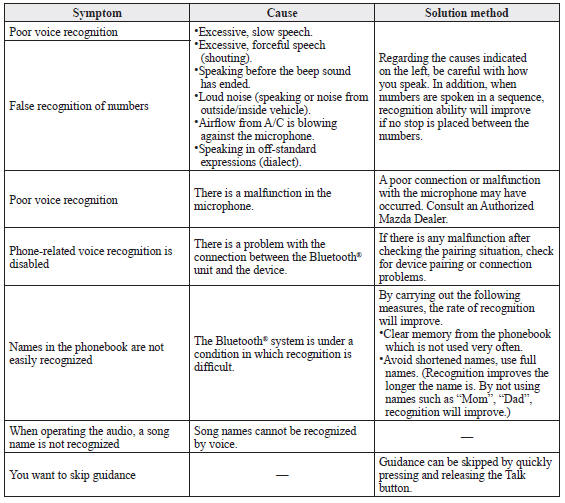
Voice recognition related problems
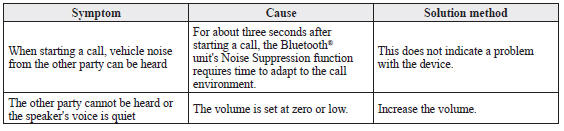
Regarding problems with calls
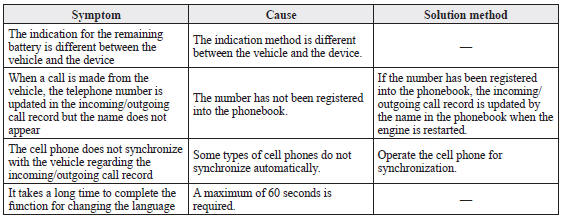
Other problems
Test yourself
A quick Mazda 3 quiz: every answer comes with an explanation and a link to the manual page.
Was this page helpful?