When Driving
Active Driving Display (Some models)
In this manual: When Driving
~3min read
WARNING
Always adjust the display brightness and position with the vehicle stopped:Adjusting the display brightness and position while driving the vehicle is dangerous as doing so could distract your attention from the road ahead and lead to an accident.
CAUTION
- Do not try to adjust the angle or open/close the active driving display manually. Fingerprints on the display will make it difficult to view and using excessive force when operating it could cause damage.
- Do not place objects in the vicinity of the active driving display. The active driving display may not operate or any interference with its operation could cause damage.
- Do not place beverages near the active driving display. If water or other liquids are splashed on the active driving display, it could cause damage.
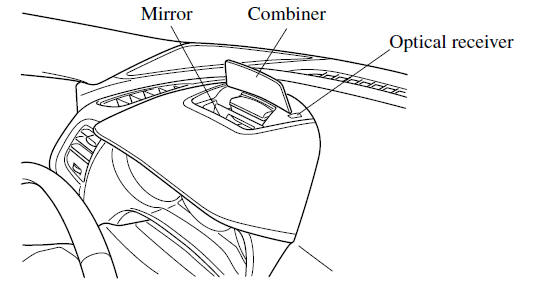
- Do not place objects above the active driving display screen or apply stickers to the combiner as they will cause interference.
- A sensor is integrated to control the display's luminosity. If the optical receiver is covered, the display's luminosity will lower making the display difficult to view.
- Do not allow intense light to hit the optical receiver. Otherwise, it could cause damage.
NOTE
- It may be difficult to view the display when wearing sunglasses. Take off your sunglasses or adjust the luminosity.
- If the battery terminal has been disconnected and re-connected or the battery voltage is low, the adjusted position may deviate.
- The display may be difficult to view or temporarily affected by weather conditions such as rain, snow, light, and temperature.
- If the audio system is removed, the active driving display cannot be operated.
The active driving display indicates the following information:
- Blind Spot Monitoring (BSM) Operation Conditions and Warnings Refer to Blind Spot Monitoring (BSM)
- Distance Recognition Support System (DRSS) Operation Conditions and Warnings Refer to Distance Recognition Support System (DRSS)
- Traffic Sign Recognition System (TSR) traffic signs and Warnings Refer to Traffic Sign Recognition System (TSR)
- Mazda Radar Cruise Control (MRCC) Operation Conditions and Warnings Refer to Mazda Radar Cruise Control (MRCC)
- Lane-keep Assist System (LAS) & Lane Departure Warning System (LDWS) Operation Conditions and Warnings Refer to Lane-keep Assist System (LAS) & Lane Departure Warning System (LDWS)
- Smart City Brake Support (SCBS) Warnings Refer to Smart City Brake Support (SCBS)
- Smart Brake Support (SBS) Operation Conditions and Warnings Refer to Smart Brake Support (SBS)
- Cruise Control Operation Conditions Refer to Cruise Control
- Navigation Guidance (vehicles with navigation system)
- Speed limit indicator (vehicles with navigation system)
- Vehicle Speed
Each setting/adjustment for the active driving display can be performed on the center display.
1. Select the  icon on the home screen and
display the Settings screen.
2. Select the AD-Disp tab.
3. Select the desired item and perform the setting/adjustment.
- Method for adjusting screen brightness (automatically/manually)
- Screen brightness initial settings (automatic adjustment is selected)
- Screen brightness adjustment (manual adjustment is selected)
- Display position of active driving display (display height)
- The combination of street name display, lane guidance, and turn by turn (TBT) can be changed. (navigation guidance)
- Active driving display ON/OFF
(indication)
- Reset settings (reset)
NOTE
The desired driving position (display position, brightness level, display information) can be called up after programming the position.
Test yourself
A quick Mazda 6 quiz: every answer comes with an explanation and a link to the manual page.
Was this page helpful?