How to Use the Bluetooth® Audio System
To listen to music or voice audio recorded to a Bluetooth® audio device, switch to the Bluetooth® audio mode to operate the audio device using the audio system control panel.
Any Bluetooth® audio device must be paired to the vehicle's Bluetooth® unit before it can be used.
Refer to Bluetooth® Preparation.
1. Turn on the Bluetooth® audio device's power.
2. Switch the ignition to ACC or ON.
3. Select the  icon on the home
screen to display the Entertainment screen.
4. When  is selected, switches
to the Bluetooth® audio mode to begin playback.
NOTE
- If Bluetooth® audio is used after using Pandora®, Aha™ or Stitcher™ radio, the application on the mobile device has to be closed first.
- If the Bluetooth® audio device does not begin playback, select the
 icon.
- If the mode is switched from Bluetooth® audio mode to another mode (radio mode), audio playback from the Bluetooth® audio device stops.
To listen to a Bluetooth® audio device over the vehicle's speaker system, switch the mode to Bluetooth® audio mode. (Refer to “Switching to Bluetooth® audio mode”)
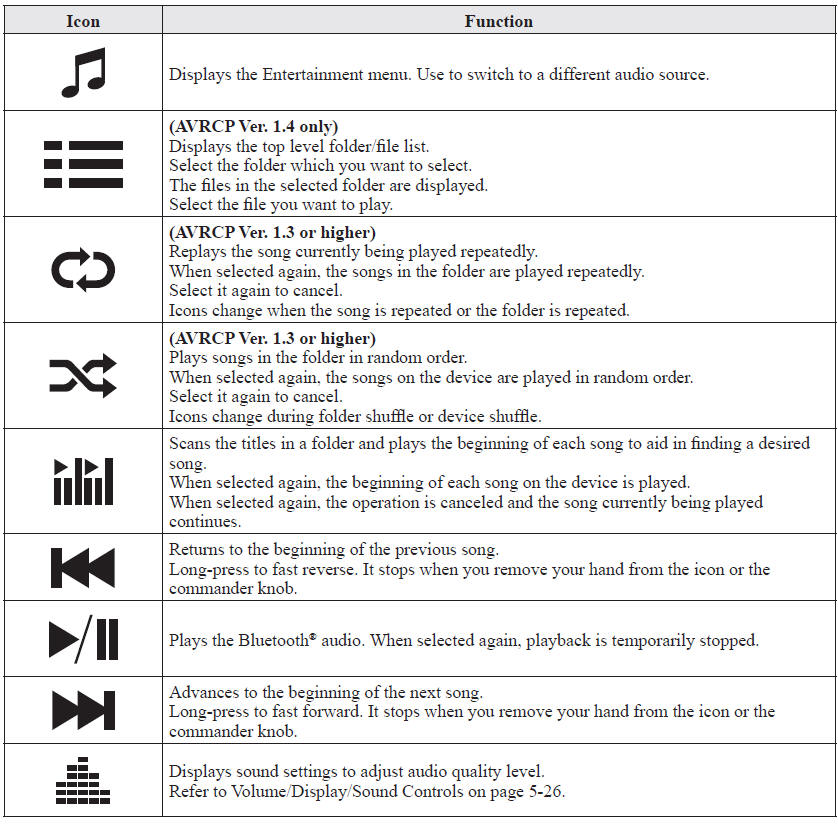
After switching to the Bluetooth® audio mode, the following icons are displayed in the lower part of the display. Icons which can be used differ depending on the version of the Bluetooth® audio device which you are currently using.
Test yourself
A quick Mazda 6 quiz: every answer comes with an explanation and a link to the manual page.