Hands-Free Telephone Setting
For the registration of a Bluetooth equipped mobile telephone to Bluetooth Hands-Free, refer to “Bluetooth Hands- Free preparation”.
Registered mobile phone read-outBluetooth Hands-Free can read-out the mobile phones registered to its system.
NOTE:Do this function only when parked. It is too distracting to attempt while driving and you may make too many errors to be effective. 1. Press the voice recognition/hands-free switch with a short press.
2. Say: [Beep] “Setup”
3. Prompt: “Select one of the following: pairing options, confirmation prompts, select phone, language, or passcode..., or say “cancel” to return to main menu.”
4. Say: [Beep] “Pairing options” 5. Prompt: “Do you want to pair a phone, delete a phone, or list paired phones?”
6. Say: [Beep] “List phones” 7. Prompt: “XXXXX..., XXXXX..., XXXXX... (Ex. Phone A, phone B, phone C)” (The voice guidance reads out the phone tags registered to the hands-free system.)
8. Prompt: “End of list, would you like to start from the beginning?” 9. Say: [Beep] “No”
10. Prompt: “Returning to main menu.”
3. Prompt: “Select one of the following: pairing options, confirmation prompts, select phone, language, or passcode..., or say “cancel” to return to main menu.”
4. Say: [Beep] “Select phone” 5. Prompt: “Please say 1 (priority 1) for XXXXX... (Ex. phone A), 2 (priority 2) for XXXXX... (Ex. phone B...)” 6. Say: [Beep] “2” (Say the priority number for the mobile phone to be used as first priority.). 7. Prompt: “XXXXX... (Ex. phone B...). (Registered phone tag) selected, is this correct?”
8. Say: [Beep] “Yes”
9. Prompt: “XXXXX... (Ex. phone B...).
(Phone tag) will temporarily override phone priorities, returning to main menu.”
Registered mobile phone deletionRegistered mobile phones can be deleted individually or collectively.
NOTE:Do this function only when parked. It is too distracting to attempt while driving and you may make too many errors to be effective. 1. Press the voice recognition/hands-free switch with a short press.
2. Say: [Beep] “Setup”
3. Prompt: “Select one of the following: pairing options, confirmation prompts, select phone, language, or passcode..., or say “cancel” to return to main menu.”
4. Say: [Beep] “Pairing options” 5. Prompt: “Do you want to pair a phone, delete a phone, or list paired phones?”
A registered mobile phone can be deleted using the registration list. 6. Say: [Beep] “Delete phone” 7. Prompt: “Please say 1 (priority 1) for XXXXX... (Ex. phone A), 2 (priority 2) for XXXXX... (Ex. phone B...)” (The voice guidance reads out each phone in the order of priority and the phone tag). 8. Say: [Beep] “2” (Say the order of priority of the mobile phone to be deleted.). NOTE
Say “All” to delete all mobile phones. 9. Prompt: “Removing XXXXX... (Ex.
phone B...) (Registered phone tag). Is this correct?”
10. Say: [Beep] “Yes”
11. Prompt: “Deleted”
If a passcode is set, the system cannot be activated unless the passcode is input.
NOTE:Do this function only when parked. It is too distracting to attempt while driving and you may make too many errors to be effective. Passcode setting 1. Press the voice recognition/hands-free switch with a short press. 2. Say: [Beep] “Setup”
3. Prompt:“Select one of the following: pairing options, confirmation prompts, select phone, language, or passcode..., or say “cancel” to return to main menu.”
4. Say: [Beep] “Passcode” 5. Prompt: “Passcode is disabled. Would you like to enable it?”
6. Say: [Beep] “Yes”
7. Prompt:“Please say a 4-digit passcode. Remember this passcode. It will be required to use this system.” 8. Say: [Beep] “XXXX” (Say a desired 4- digit passcode, “PCode”.).
9. Prompt:“Passcode XXXX (Passcode, PCode). Is this correct?” 10. Say: [Beep] “Yes”
11. Prompt:“Passcode is enabled, returning to main menu.”
If the passcode is incorrect, voice guidance “XXXX (4-digit passcode, Pcode) incorrect passcode, please try again” is announced.
Canceling the passcode NOTE:Do this function only when parked. It is too distracting to attempt while driving and you may make too many errors to be effective. 1. Press the voice recognition/hands-free switch with a short press.
2. Say: [Beep] “Setup”
3. Prompt: “Select one of the following: pairing options, confirmation prompts, select phone, language, or passcode..., or say “cancel” to return to main menu.”
4. Say: [Beep] “Passcode” 5. Prompt:“Passcode is enabled. Would you like to disable it?” 6. Say: [Beep] “Yes”
7. Prompt:“Passcode is disabled, returning to main menu.”
(Ex. “Calling John's phone. Is this correct?”).
When the confirmation prompt function is turned off:
(Ex. “Calling John's phone.”)
If the confirmation prompt function is turned off when making an emergency call, the system reads out and confirms the command before executing it. 1. Press the voice recognition/hands-free switch with a short press.
2. Say: [Beep] “Setup”
3. Prompt:“Select one of the following: pairing options, confirmation prompts, select phone, language, or passcode..., or say “cancel” to return to main menu.”
4. Say: [Beep] “Confirmation prompts” 5. Prompt:“Confirmation prompts are on/off. Would you like to turn confirmation prompts off/on?” 6. Say: [Beep] “Yes”
7. Prompt:“Confirmation prompts are off/on, returning to main menu.”
The registration must be performed completely. The required time is a few minutes. The user needs to be seated in the driver's seat with the voice input command list for voice recognition learning open to the page indicated below.
1. Press the voice recognition/hands-free switch with a short press. 2. Say: [Beep] “Voice training” 3. Prompt: “This operation must be performed in a quiet environment while the vehicle is stopped. See the owner's manual for the list of required training phrases. Press and release the phone button when you are ready to begin. Press and hold the phone button to cancel at any time.”4. Press the voice recognition/hands-free switch with a short press. 5. The voice guidance reads out the voice input command number (refer to the voice input command list for voice recognition learning). (Ex. “Please read phrase 1”). 6. Say: [Beep] “0123456789” (Say the voice input command for voice recognition learning (1 to 8) according to the voice guidance.).
7. Prompt: “Speaker enrollment is complete, returning to main menu.”
Voice input command list for voice recognition learning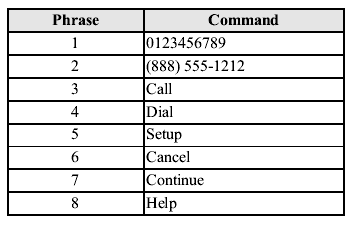
When reading out, the following points must be observed:
- Read out the numbers one at a time correctly and naturally. (For example, “1234” must be read out “one, two, three, four”, not “twelve, thirty four”.). - Do not read out parentheses. “ (” and hyphens “-” are used for separating numbers in a phone number. Ex.
“ (888) 555-1212” must be spoken “Eight, eight, eight, five, five, five, one, two, one, two.”
NOTE:After user voice registration is completed, voice guidance “Speaker enrollment is complete, returning to main menu” is announced. DTMF (dual tone multifrequency signal) transmission
This function is used when transmitting DTMF via the user's voice. The receiver of a DTMF transmission is generally a home telephone answering machine or a company's automated guidance call center (When you send tone signals back according to the voice guidance recording).
1. Press the voice recognition/hands-free switch with a short press. 2. Say: [Beep] “XXXX... send” (Say DTMF code).3. Prompt: “Sending XXXX... (DTMF code)”
Test yourself
A quick Mazda MX-5 quiz: every answer comes with an explanation and a link to the manual page.