Audio Control Switch Operation (Steering Wheel)
* Some models.
When the audio unit is turned on, operation of the audio unit from the steering wheel is possible.For navigation system equipped vehicles, refer to the separate manual “NAVIGATION SYSTEM”.
NOTE. Because the audio unit will be turned off under the following conditions, the switches will be inoperable. - When the ignition switch is turned to the LOCK position. - When the power button on the audio unit is pressed and the audio unit is turned off.- When the CD being played is ejected and the audio unit is turned off.
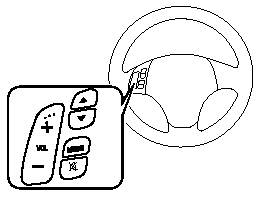
Without Bluetooth Hands-Free
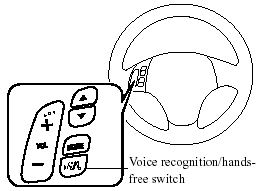
With Bluetooth Hands-Free NOTE. - The Voice recognition/hands-free switch is operable with the audio unit turned off. - Mazda has installed this system to prevent distraction while driving the vehicle and using audio controls on the dashboard.
Always make safe driving your first priority.
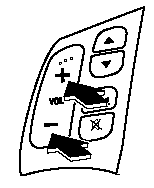
Adjusting the Volume To increase the volume, press the volume button (+).To decrease the volume, press the volume button (-).
Changing the Source
Press the mode switch ( ) to change
the audio source (FM1 radio> FM2 radio> AM radio> CD player or CD changer> SIRIUS1> SIRIUS2> SIRIUS3> AUX> cyclical).

NOTE. CD, CD changer, and SIRIUS digital satellite radio modes cannot be selected in the following cases:
· CD, CD changer, or SIRIUS digital satellite radio unit is not equipped on the audio system. · CD has not been inserted. Connect a portable audio unit or similar product on the market to the auxiliary jack to listen to music or audio over the vehicle's speakers. Change the audio source to AUX mode.
The audio source is changed to the AUX mode only when a commercially available portable audio unit is connected to the auxiliary jack.
Seek Switch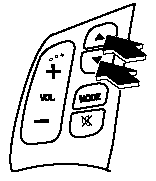
When listening to the radio or SIRIUS digital satellite radio Press the seek switch (
 ,
 ), the radio
switches to the next/previous stored station in the order that it was stored (1 - 6).
Press the seek switch ( , ) for about 2
seconds until a beep sound is heard to seek all usable stations at a higher or lower frequency whether programmed or not.]
) to skip to the
next track. Press the seek switch (
) to repeat the current track. Press the seek switch (
) for about 2 seconds until a beep sound is heard to advance through a track at high speed.
Press the seek switch () for about 2
seconds until a beep sound is heard to reverse through a track at high speed.
Press the mute switch ( ) once to mute
audio, press it again to resume audio output.
Therefore, when the engine is restarted, the audio is not muted. To mute the audio again, press the mute switch (
). 
Test yourself
A quick Mazda MX-5 quiz: every answer comes with an explanation and a link to the manual page.