Lighting and windshield wipers
Replacing the rear bulbs
In this manual: Lighting and windshield wipers
3steps
~18min
2/5difficulty
Done 0 of 3
Opening and closing the side trim
Before you can replace the bulbs in the rear light clusters, you must open the side trim of the cargo compartment.

Left side trim
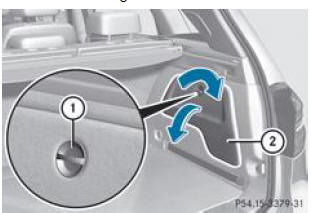
Right side trim
- Opening: turn the unlocking knob 1 90° in the direction of the arrow and remove the side trim 2.
- Closing: reinstall the side trim 2 and turn the unlocking knob 1 90° in the direction opposite to the arrow.
Rear light clusters
Turn signals/rear lights and brake lights
- Switch off the lighting system.
- Open the cargo compartment.
- Open the side trim.

- Press the retaining tabs 1 simultaneously in the direction of the arrow and remove the bulb holder.

Bulb holder
- Rear light/brake light [1]
- Turn signal (vehicles without LED)
- Rear light (vehicles without LED)
- Press the defective bulb lightly into the bulb holder, then turn it counterclockwise to remove it from the bulb holder.
- Insert the new corresponding bulb into the bulb holder and turn it clockwise.
- Reinstall the bulb holder and press it in.
The retaining tabs of the bulb holder click audibly into place.
- Close the side trim.
Reversing lights and rear fog light
Due to limited accessibility, we recommend having the reversing light and rear fog light bulbs in the tailgate replaced by a qualified workshop.
- Switch off the lighting system.
- Open the tailgate.
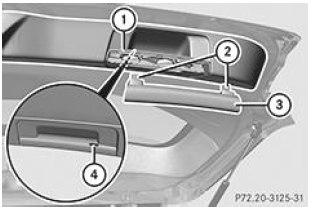
- Insert a flat, smooth object (such as a screwdriver) into the recess 4 on the inside of the assisted closing handle and pry off the upper part of the handle 3.
- Detach the lower part 1 of the handle from the trim by pulling sharply and set it aside.
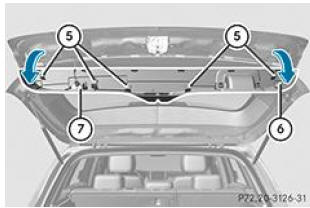
- Grasp the trim 6 from the inside on the right side and unclip it along its full length by pulling gently.
- Unlock the 2 locks of the connector of the marker light 7 and disconnect it.
- Set the trim 6 aside.
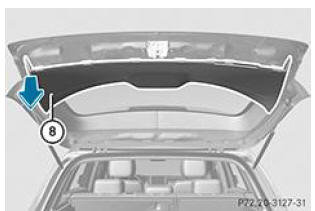
- On the side where the bulb must be replaced, unclip the remaining part of the trim 8 by pulling sharply until the bulb holder 9 is accessible.
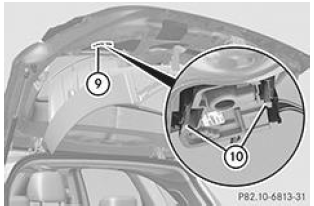
- Unlock the bulb holder 9 using the 2 side levers 10.
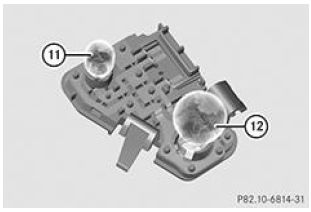
Bulb holder
- Rear fog light 11: press the bulb lightly into the bulb holder 9, then turn it counterclockwise to remove it from the bulb holder 9.
- Insert the new bulb into the bulb holder 9 and turn it clockwise.
- Reversing lights 12: remove the bulb from the bulb holder 9.
- Insert the new bulb into the bulb holder 9.
- Reinstall the bulb holder 9 until it clicks audibly into place.
- Reinstall the trim 8 and tap it lightly with your hand until it clicks into place.
- Before continuing the installation, check that the removed parts include all metal clips (2 clips 2 on the upper part of the handle 3 and 5 clips 5 on the trim 6).
- If not, remove the metal clips left in the tailgate openings and insert them into the corresponding locations.
- Take the trim 6 and connect the connector 7 of the marker light.
- Reinstall the trim 6 and tap it lightly with your hand, starting from the outside, until it clicks into place.
- Clip the lower part of the handle 1 back on.
- Push the upper part of the handle 3 into the lower part 1 until it clicks into place.
License plate light
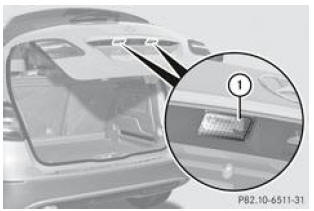
- Switch off the light.
- Open the tailgate.
- Insert a screwdriver from the outside under the lens 1.
- Pry the lens 1 up and remove it.
- Replace the bulb.
- Reinstall the license plate light lens 1 and press it until it clicks into place.
Footnotes
[1] Vehicles equipped with LEDs: brake light only.
Test yourself
A quick Mercedes-Benz B-Class quiz: every answer comes with an explanation and a link to the manual page.
Was this page helpful?