Mobile phone
Important notes
WARNINGWhen using mobile communication devices in the vehicle, observe the legal regulations in force in the country where you are.
If the law permits the use of mobile communication devices while driving, only use them when traffic conditions allow it. Otherwise, you could be distracted from the traffic, cause an accident, and be injured or injure others.
Radiotelephones and fax machines that are not connected to a low-reflection external antenna can interfere with the vehicle's electronics, thereby compromising the operational safety of the vehicle and, consequently, your own safety. Therefore, only use these devices if they are connected to a separate low-reflection external antenna, as required by regulations.
WARNINGExcessive electromagnetic radiation can be harmful to your health and that of others. Using an external antenna protects against possible risks associated with electromagnetic fields, which are currently being debated in the scientific community.
Mercedes-Benz recommends connecting an approved external antenna. This helps
- to ensure optimum reception quality for mobile phones inside the passenger compartment
- to minimise interference between the vehicle's electronics and mobile phones
A connected antenna offers the following advantages:
- It directs the electromagnetic fields emitted by mobile radiotelephones outward.
- The field strength inside the vehicle is reduced compared with use without an external antenna.
For more information on the mobile phones that can be used, the holders, and connecting a mobile phone compatible with Bluetooth® to the Audio 20 system or to COMAND Online,
- contact a Mercedes-Benz Service Centre
- visit the website http://www.mercedes-benz.com/connect
Inserting the mobile phone
- Open the phone storage compartment.
- Insert the phone holder into the preinstalled bracket (see the phone holder installation instructions).
- Place the phone in the holder (see the phone holder installation instructions).
When the mobile phone is in the holder, you can make calls using the hands-free system.
With certain holders, you must first connect the mobile phone to the holder via Bluetooth® (see the holder operating instructions).These holders allow you to use the phone's functions even when the phone is not in the holder. In this case, the charging and antenna functions are not available.
Using the mobile phone
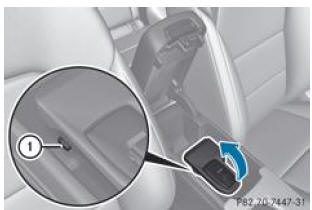
- Raising the bracket: press button 1.
- Lowering the bracket: press the bracket until it locks.
You can fold up the preinstalled holder to gain easier access to the storage compartment underneath. Depending on the vehicle's equipment, the storage compartment may contain a USB port and an AUX IN jack or a media interface.
You can use the telephone via the buttons and
 on the multifunction steering wheel. The on-board computer
allows you to access other functions of the mobile phone.
The mobile phone remains operational after you have removed the key from the ignition lock, but you can no longer make calls using the hands-free system.
If you want to remove the key from the ignition lock while on a call, you must first remove the mobile phone from the holder, otherwise the call will be disconnected.
If you use a holder that is connected to the mobile phone via Bluetooth® and you want to continue a call in "Private Mode", you must carry out the necessary steps on the mobile phone (see the mobile phone operating instructions).Test yourself
A quick Mercedes-Benz B-Class quiz: every answer comes with an explanation and a link to the manual page.