Operator's Manual - Mercedes-Benz B-Class

Using the on-board computer

5steps
~30min
2/5difficulty
Done 0 of 5

Overview
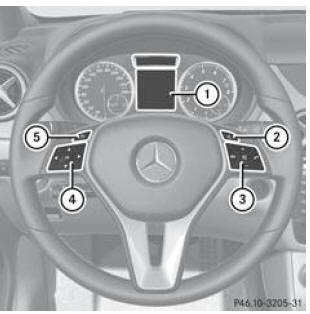
  1. Multifunction display
  2. Activating LINGUATRONIC (see separate operator's manual)
  3. Right-hand button group
  4. Left-hand button group
  5. Back button
  • Switching on the on-board computer: turn the key to position 1 in the ignition switch.

    The buttons on the multifunction steering wheel are used to control the displays on the multifunction display and to make settings in the on-board computer.

Left-hand button group

  • Displaying the menu bar and selecting a menu
Short press:
  • Scrolling within a list
  • Selecting a submenu or function
  • In the Audio menu: selecting a stored station, audio track or video scene
  • In the Tel (telephone) menu: opening the phone book and selecting a name or telephone number
Long press:
  • In the Audio menu: selecting the next or previous station, or selecting an audio track or video scene with fast scrolling
  • In the Tel (telephone) menu: starting fast scrolling through phone book entries
  • Confirming the selection and message
  • In the Tel (telephone) menu: opening the phone book and starting dialling of the selected number
  • In the Audio menu: stopping the station search at the desired station

Right-hand button group

  • Rejecting a call or ending a call
  • Exiting the phone book/redial memory
  • Starting or accepting a call
  • Switching to redial memory
  • Adjusting volume
  • Muting and unmuting sound

Back button

Short press:
  • Back
  • Switching off LINGUATRONIC, see the separate operator's manual
  • Hiding messages on the display / showing the last function used in the Trip menu
  • Exiting the phone book or redial memory
Long press:
  • Showing the standard display of the Trip menu

Test yourself

A quick Mercedes-Benz B-Class quiz: every answer comes with an explanation and a link to the manual page.