Settings menu
Introduction
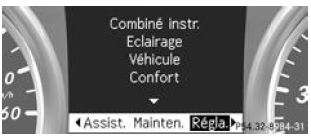
The Settings menu allows you to carry out the following functions:
- Changing the instrument cluster settings
- Changing the lighting settings
- Changing the vehicle settings
- Changing the comfort settings
- Resetting to factory settings
Instrument cluster
Selecting the distance display unit
You can set the display unit (kilometers or miles) for certain values on the multifunction display.
- Press the button
 or the button
 on the steering wheel to select the Settings .
- Press the button
 or the button
 to select the Instr. cluster submenu .
- Confirm with
 .
- Press the button
 or the button
 to select the Tachometer/odometer display unit function .
The selected setting (km or miles) appears.
- Press the button
 to change the setting.
The distance unit applies to:
- the digital speedometer in the Trip menu
- the total odometer and the trip odometer
- the on-board computer
- the instantaneous fuel consumption and the range
- the navigation messages in the Nav menu
- CRUISE CONTROL
- SPEEDTRONIC
- DISTRONIC PLUS
- the ASSYST PLUS service interval indicator
Activating and deactivating the additional speedometer
This function is only available on vehicles equipped with a manual transmission.
- Press the buttonor the buttonon the steering wheel to select the Settings .
- Press the buttonor the buttonto select the Instr. cluster submenu .
- Confirm with.
- Press the buttonor the buttonto select the Add. speedometer [mph] function .
The selected setting (activated or deactivated) appears.
- Press the buttonto change the setting.
The speed is displayed in mph.
This function is not available on vehicles intended for Great Britain.The Additional speedometer [mph] function lets you determine whether the multifunction display shows the speed in mph instead of the outside temperature in the status area.
Selecting the permanent display
You can determine whether the multifunction display permanently shows the outside temperature or the speed.
- Press the buttonor the buttonon the steering wheel to select the Settings .
- Press the buttonor the buttonto select the Instr. cluster submenu .
- Confirm with .
- Press the buttonor the buttonto select the Permanent display function .
The selected setting Outside temp. or Additional speedometer [mph] appears.
- Press the buttonto change the setting.
The speed is displayed in mph.
This function is not available on vehicles intended for Great Britain.Lighting
Activating and deactivating daytime running lights
- Switch off the engine.
- Press the buttonor the buttonon the steering wheel to select the Settings .
- Press the buttonor the buttonto select the Lighting submenu .
- Confirm with .
- Press the buttonor the buttonto select the Daytime running lights function .
The selected setting (activated or deactivated) appears.
- Press the buttonto change the setting.
For more information on daytime running lights, see
Activating and deactivating Intelligent Light System
- Press the buttonor the buttonon the steering wheel to select the Settings .
- Press the buttonor the buttonto select the Lighting submenu .
- Confirm with.
- Press the buttonor the buttonto select the Intelligent Light System function .
The selected setting (activated or deactivated) appears.
- Press the buttonto change the setting.
When you activate the Intell. Light System function, the following functions are also activated:
- Motorway light
- Active cornering light
- Intersection light
- Extended function fog light
When you set the low beams for right-hand or left-hand traffic, the multifunction display shows the message Intell. Light System: system not functioning. Inactive when driving on left or the message Intell. Light System: system not functioning. Inactive when driving on right in the Lighting submenu instead of the Intell. Light System function.
Setting the low beams for right-hand or left-hand traffic
- Press the buttonor the buttonon the steering wheel to select the Settings .
- Press the buttonor the buttonto select the Lighting submenu .
- Confirm with.
- Press the buttonor the buttonto select the Low beam setting for function .
The selected setting Right-hand traffic or Left-hand traffic appears.
- Press the buttonto change the setting.
If you change the setting, the change only takes effect when the vehicle is next stopped.
This function is only available on vehicles equipped with Intelligent Light System.
This function lets you switch between symmetrical and asymmetrical low beams.
When you set the low beams for right-hand or left-hand traffic, motorway lighting and extended-function fog lamps are not available.
You can also have the low beams set for right-hand or left-hand traffic by a qualified workshop, for example a Mercedes-Benz Service Center.
Activating and deactivating adaptive high beam assist
- Press the buttonor the buttonon the steering wheel to select the Settings .
- Press the buttonor the buttonto select the Lighting submenu .
- Confirm with.
- Press the buttonor the buttonto select the Adaptive high beam assist function .
The selected setting (activated or deactivated) appears.
- Press the buttonto change the setting.
Activating and deactivating surround lighting and delayed switch-off of exterior lighting
If you activate the Surround lighting function and the light switch is set to , the following functions are also activated in the dark:
- Surround lighting: the exterior lighting switches off 40 seconds after you unlock the vehicle with the key. When the engine starts, surround lighting is deactivated and automatic exterior lighting is activated.
- Delayed switch-off of exterior lighting: the exterior lighting switches off 60 seconds after you stop the engine. If you close all doors and the tailgate, the exterior lighting switches off after 15 seconds.
- Press the buttonor the buttonon the steering wheel to select the Settings .
- Press the buttonor the buttonto select the Lighting submenu .
- Confirm with.
- Press the buttonor the buttonto select the Surrounding area lighting function .
The selected setting (activated or deactivated) appears.
- Press the buttonto change the setting.
Temporarily deactivating delayed switch-off of exterior lighting:
- Before leaving the vehicle, turn the key to position 0 in the ignition switch.
- Turn the key to position 2 in the ignition switch.
Delayed switch-off of exterior lighting is deactivated.
Delayed switch-off of exterior lighting will be reactivated when the engine is next started.
When surroundings lighting and delayed switch-off of exterior lighting are activated, the following lights switch on depending on the vehicle's equipment:- Position lamps
- Fog lamps
- Low beam
- Daytime running lights
- Surround lighting in the exterior mirrors
Activating and deactivating delayed switch-off of interior lighting
If you activate the Interior lighting delay function, the interior lighting stays on for 20 seconds after you remove the key from the ignition switch.
- Press the buttonor the buttonon the steering wheel to select the Settings .
- Press the buttonor the buttonto select the Lighting submenu .
- Confirm with.
- Press the buttonor the buttonto select the Interior lighting delay function .
The selected setting (activated or deactivated) appears.
- Press the buttonto change the setting.
Vehicle
Setting the permanent SPEEDTRONIC
- Press the buttonor the buttonon the steering wheel to select the Settings .
- Press the buttonor the buttonto select the Vehicle submenu .
- Confirm with.
- Press the buttonor the buttonto select the Limit (winter tyres) function .
The current setting appears.
- Confirm with.
- Press the buttonor the buttonto adjust permanent SPEEDTRONIC in steps of 10 ( 230 km/h to 160 km/h ). If you select the setting off , you deactivate permanent SPEEDTRONIC.
- Press the buttonto save your entry.
The Limit (winter tires) function lets you set the permanent SPEEDTRONIC.
Activating and deactivating automatic door locking
- Press the buttonor the buttonon the steering wheel to select the Settings .
- Press the buttonor the buttonto select the Vehicle submenu .
- Confirm with.
- Press the buttonor the buttonto select the Auto door locking function
The selected setting (activated or deactivated) appears.
- Press the buttonto change the setting.
If you activate the Automatic door locking function, your vehicle locks centrally from a speed of approximately 15 km/h.
For more information on automatic locking, see
Activating and deactivating the locking confirmation tone
If you activate the Locking confirmation tone function, an acoustic signal sounds when the vehicle is locked.
- Press the buttonor the buttonon the steering wheel to select the Settings .
- Press the buttonor the buttonto select the Vehicle submenu .
- Confirm with.
- Press the buttonor the buttonto select the Locking confirmation tone function.
The selected setting (activated or deactivated) appears.
Press the button to change the setting.
Activating and deactivating the radar sensor system
- Press the buttonor the buttonon the steering wheel to select the Settings .
- Press the buttonor the buttonto select the Vehicle submenu .
- Confirm with.
- Press the buttonor the buttonto select Radar sensors (see Operator's Manual) .
The selected setting (activated or deactivated) is displayed.
- Press the buttonto change the setting.
When the radar sensor system is deactivated, Blind Spot Assist is also deactivated.
Comfort
Activating and deactivating seat belt adjustment
- Press the buttonor the buttonon the steering wheel to select the Settings .
- Press the buttonor the buttonto select the Comfort submenu.
- Confirm with .
- Press the buttonor the buttonto select the Belt adjustment function.
The selected setting (activated or deactivated) appears.
- Press the buttonto change the setting.
For more information on seat belt adjustment, see.
Activating and deactivating exterior mirror folding when locking
- Press the buttonor the buttonon the steering wheel to select the Settings .
- Press the buttonor the buttonto select the Comfort submenu.
- Confirm with .
- Press the buttonor the buttonto select the Mirror lowering when locking function.
The selected setting (activated or deactivated) appears.
- Press the buttonto change the setting.
If you activate the Mirror folding when locking function, the exterior mirrors fold in as soon as you lock the vehicle. The exterior mirrors unfold if you unlock the vehicle and open a front door.
If you have activated the function and then fold the exterior mirrors using the button on the door, they do not unfold automatically. You can only unfold them by pressing the button on the door.
Resetting to factory settings
- Press the buttonor the buttonon the steering wheel to select the Settings .
- Press the buttonor the buttonto select the Factory settings submenu.
- Confirm with .
The message Reset all settings? is displayed.
- Press the buttonor the buttonto select No or Yes.
- Press the buttonto confirm the selection.
If you have selected Yes, a confirmation message appears in the multifunction display.
For safety reasons, not all factory settings are restored: the Limit (winter tyres) function of permanent SPEEDTRONIC can only be set in the Vehicle submenu. If you want to reset the Daytime running lights function in the Lighting submenu, turn the key to position 1 in the ignition switch.
Test yourself
A quick Mercedes-Benz B-Class quiz: every answer comes with an explanation and a link to the manual page.