On-board computer and displays
Multifunction display
In this manual: On-board computer and displays
6steps
~36min
2/5difficulty
Done 0 of 6
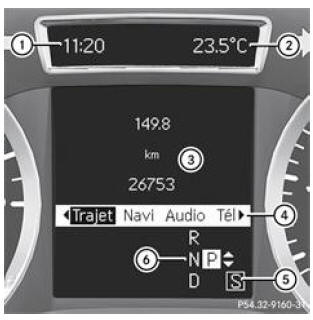
Multifunction display with automatic transmission (example)
- Time
- Display of outside temperature or speed
- Text field
- Menu bar
- Driving program
- Transmission position
- Displaying the menu bar 4: press the button
 or the button
 on the steering wheel.
The menu bar disappears after a few seconds.
The text field shows the selected menu or submenu and lets you read messages.
The menu bar 4 disappears after a few seconds.
The text field 3 shows the selected menu or submenu and lets you read messages.
You can set the time using the Audio 20 system or COMAND Online. See the separate operator's manual.The following information can be displayed on the multifunction display:
 | Gear change recommendation |
 | Active Parking Assist |
 | CRUISE CONTROL |
| LIM | SPEEDTRONIC |
 | Rear wiper |
 | Adaptive Highbeam Assist |
 | ATTENTION ASSIST |
 | ECO start/stop function |
 | Speed limit assist |
 | Lane departure warning |
 | HOLD function |
 | Distance alert |
120 km/h! Exceeding the maximum permitted speed (only for certain countries)
Test yourself
A quick Mercedes-Benz B-Class quiz: every answer comes with an explanation and a link to the manual page.
Was this page helpful?