Displays and controls. Multifunction display
The multifunction display in the Mercedes E-Class (4th generation, W212, 2009–2016) clearly shows important driving data and information about assistance systems. The display makes it easier to monitor vehicle functions and contributes to safe driving. Examples show its use in everyday driving.
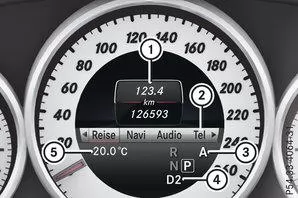
Multifunction display automatic transmission DIRECT SELECT (example)
 |
Text field |
 |
Menu bar |
 |
Driving program, vehicles with DIRECT SELECT selector lever or AMG vehicles |
 |
Transmission position, vehicles with DIRECT SELECT selector lever or AMG vehicles |
 |
Permanent display: outside temperature or speed |
 Menu barDisplay: press
 or
 button on the steering wheel.is hidden after a few seconds. The text fieldshows the selected menu or submenu as well as display messages.
| The multifunction display can show the following: | ||
|---|---|---|
 |
Gear shift indicator for manual transmission or automatic transmission (manual shifting) | |
 |
Active Park Assistant | |
 |
CRUISE CONTROL | |
 |
SPEEDTRONIC | |
 |
Adaptive High Beam Assist Plus | |
 |
ECO Start/Stop function | |
 |
HOLD function | |
| 120 km/h! | Maximum permitted speed exceeded (only for certain countries) | |
The multifunction display of the Mercedes E-Class W212 (model years 2009–2016) clearly shows the driver all relevant information. Whether cruise control, driving program or warning messages, the display supports safe operation of the vehicle.
Mercedes shows here how modern technology and intuitive operation enhance driving comfort and safety.
Question: What is the function of the text field in the multifunction display?
Answer: It shows selected menus, submenus and warning messages.
Question: What does a lit segment in the speedometer mean?
Answer: It shows the currently stored speed range of cruise control or DISTRONIC PLUS.
Test yourself
A quick Mercedes-Benz E-Class quiz: every answer comes with an explanation and a link to the manual page.