Displays and controls. Operating the on-board computer
The on-board computer in the Mercedes E-Class (4th generation, W212, 2009–2016) can be operated conveniently using the multifunction steering wheel. This chapter explains the functions of the buttons and provides tips for navigating through menus and submenus. This makes operating the vehicle convenient and safe.
Overview
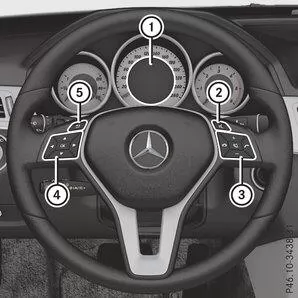
 |
Multifunction display |
 |
Vehicles with Audio 20: Switch on voice control navigation (see manufacturer's operator's manual) |
| Vehicles with COMAND Online: Switch on LINGUATRONIC (see separate operator's manual) | |
 |
Right-hand control panel |
 |
Left-hand control panel |
 |
Back button |
 Activating the on-board computer: Turn the key in the ignition lock to position 1.
Use the buttons on the multifunction steering wheel to control the display in the multifunction display and the settings in the on-board computer.
Left-hand control panel

 |
|

 |
Press briefly:
|
|
|
Press and hold:
|
 |
|
Right-hand control panel
 |
|
 |
|
  |
|
 |
|
Back button
 |
Press briefly:
|
|
Press and hold:
|
The on-board computer in the Mercedes E-Class W212 (model years 2009–2016) can be operated conveniently using the multifunction steering wheel. The clear menu structure helps the driver quickly find important settings and information.
In this way, the system contributes to safe and convenient vehicle operation, another example of the sophisticated technology of the E-Class.
Test yourself
A quick Mercedes-Benz E-Class quiz: every answer comes with an explanation and a link to the manual page.