Instruments and controls
Changing the meter screen view (model with full-screen display)
In this manual: Instruments and controls
3steps
~18min
2/5difficulty
Done 0 of 3
On models equipped with the full-screen display, the meter layout can be changed to enlarge the multi-information display area and provide more space for selected driving information.
How to use the multi-information display
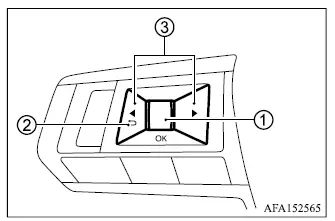
The multi-information display is operated using scroll dial 1 and the steering wheel buttons  2, and
 3.
- Scroll dial - rotate the dial to move through menus and available items, then press it to confirm a selection or change the highlighted setting in the multi-information display.
 - return to the previous menu or display level.
 - move from one main information screen to the next, such as trip data or fuel economy.
Startup display
When the ignition switch is placed in the ON position, the multi-information display may provide access to the following screens, depending on the equipment installed in the Mitsubishi Outlander:
- Home
- Drive Computer - Average Speed, Trip Distance and Time, and Fuel Economy
- Compass or Navigation
- Audio
- MI-PILOT Assist
- Driving Aids
- Tire Pressures
- S-AWC
- Warning
- Settings
Warning screens appear only when the vehicle has an active condition or message that requires the driver's attention.
Was this page helpful?