Monitor, climate, audio, phone and voice recognition systems
Control panel buttons — color screen with Navigation System (if so equipped)
In this manual: Monitor, climate, audio, phone and voice recognition systems
~1min read
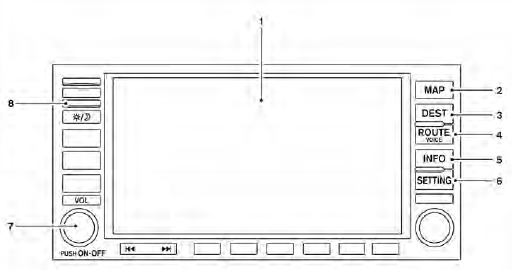
1. Display screen
2. MAP button*
3. DEST button*
4. ROUTE/VOICE button*
5. INFO button (P. 4-5)
6. SETTING button (P. 4-6)
7. Volume control knob
8.  (brightness control) button
*For Navigation system control buttons, refer to the separate Navigation System Owner’s Manual.
When you use this system, make sure the engine is running.
If you use the system with the engine not running (ignition ON or ACC) for a long time, it will discharge the battery, and the engine will not start.
Reference symbols:
“Example” — Words marked in quotes refer to a key shown only on the display. These keys can be selected by touching the screen.
Test yourself
A quick Nissan Altima quiz: every answer comes with an explanation and a link to the manual page.
Was this page helpful?