How to use the INFO button
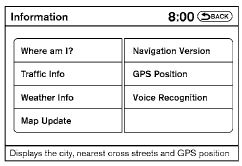
Press the INFO button; the display screen shows vehicle and navigation information for your convenience.
Where am I?
Refer to the separate Navigation System Owner’s Manual for information regarding this item.
Traffic Info
Refer to the separate Navigation System Owner’s Manual for information regarding this item.
Weather Info
Refer to the separate Navigation System Owner’s Manual for information regarding this item.
Map Update
Refer to the separate Navigation System Owner’s Manual for information regarding this item.
Navigation Version
Refer to the separate Navigation System Owner’s Manual for information regarding this item.
GPS Position
For GPS Position, refer to the separate Navigation System Owner’s Manual.
Voice Recognition settings
For Voice Recognition settings, refer to “NISSAN Voice Recognition system” in this section.
Test yourself
A quick Nissan Altima quiz: every answer comes with an explanation and a link to the manual page.