Monitor, climate, audio, phone and voice recognition systems
Giving voice commands
In this manual: Monitor, climate, audio, phone and voice recognition systems
~1min read
1. Press the  switch located on the steering wheel.
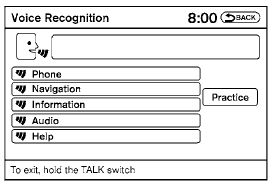
2. A list of commands appears on the screen, and the system announces, “Would you like to access Phone, Navigation, Information, Audio or Help?”
3. After the tone sounds and the icon on the screen changes from  to
 , speak a command.
4. Continue to follow the voice menu prompts and speak after the tone sounds until your desired operation is completed.
Test yourself
A quick Nissan Altima quiz: every answer comes with an explanation and a link to the manual page.
Was this page helpful?