Illustrated table of contents
Cockpit
In this manual: Illustrated table of contents
20steps
~120min
4/5difficulty
Done 0 of 20
Example
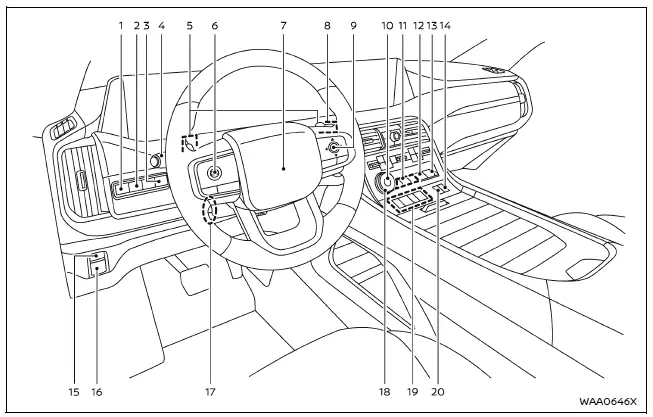
The cockpit of the Nissan Armada is engineered to provide maximum control, comfort, and advanced driver assistance integration. Every switch and control element is strategically positioned to ensure intuitive access, allowing the driver of the Nissan Armada to stay focused on the road while benefiting from modern technology and ergonomic design.
- Steering Assist switch
- Head Up Display (HUD) switch*
- Power liftgate switch*
- Headlight and turn signal switch
Fog light switch* - Paddle shifters
- Steering-wheel-mounted controls (left side)
- ProPILOT Assist switch
- Volume control**
- Steering wheel
- Horn
- Wiper and washer switch
- Steering-wheel-mounted controls (right side)
- Vehicle information display control
- Touch screen display control**
- Audio control**
- Bluetooth Hands-Free Phone System switches**
- Voice Recognition system switch**
- Hill descent control switch*
- 4WD shift switch*
- Differential lock mode switch*
- Vehicle Dynamic Control (VDC) OFF switch
- Idling Stop OFF switch
- Automatic brake hold switch
- Parking brake switch
- Tilt and telescopic steering wheel control*
Tilt and telescopic steering lock lever* - Drive mode selector*
- Shift buttons
- Air suspension AUTO switch*
*: if so equipped
**: Refer to the separate NissanConnect Owner's Manual (if so equipped).
Was this page helpful?