Illustrated table of contents
Instrument panel
In this manual: Illustrated table of contents
19steps
~114min
4/5difficulty
Done 0 of 19
Example
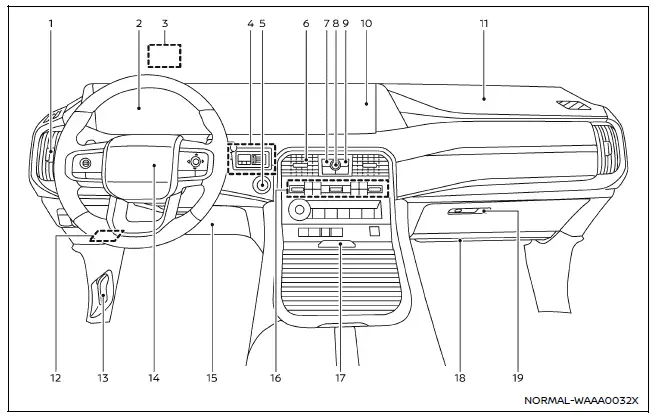
The instrument panel of the Nissan Armada combines traditional controls with advanced digital interfaces, delivering a seamless driving experience. The layout ensures that all critical vehicle information and multimedia functions are easily accessible to the driver.
- Side ventilator
- Meters and gauges Clock
- Head Up Display (HUD)*
- Trailer Brake Controller Unit (TBCU)*
- Push-button ignition switch
- Center ventilator
- CAMERA*/ button
- Audio switches**
- Hazard indicator flasher switch
- Touch screen display
- Intelligent Around View Monitor*
- RearView monitor*
- NissanConnect system**
- Heater and air conditioner
- Defroster
- Heated steering wheel*
- Heated seats*
- Ventilated seats*
- Front passenger supplemental air bag
- Fuse box
- Hood release handle
- Driver supplemental front-impact air bag
- Driver supplemental knee air bag
- Heater and air conditioner
- Console box
- Cup holders
- USB connection ports**
- Wireless charger*
- Front passenger supplemental knee air bag
- Glove box
*: if so equipped
**: Refer to the separate NissanConnect Owner's Manual (if so equipped).
Was this page helpful?