Power Outlet. Usb Power Socket
Precautions
Precaution for Supplemental Restraint System (SRS) "AIR BAG" and "SEAT BELT PRE-TENSIONER"
The Supplemental Restraint System such as “AIR BAG” and “SEAT BELT PRE-TENSIONER”, used along with a front seat belt, helps to reduce the risk or severity of injury to the driver and front passenger for certain types of collision.
Information necessary to service the system safely is included in the “SRS AIR BAG” and “SEAT BELT” of this Service Manual.
To avoid rendering the SRS inoperative, which could increase the risk of personal injury or death in the event of a collision that would result in air bag inflation, it is recommended that all maintenance and repair be performed by an authorized NISSAN/INFINITI dealer.
Improper repair, including incorrect removal and installation of the SRS, can lead to personal injury caused by unintentional activation of the system. For removal of Spiral Cable and Air Bag Module, see “SRS AIR BAG”.
Never use electrical test equipment on any circuit related to the SRS unless instructed to in this Service Manual. SRS wiring harnesses can be identified by yellow and/or orange harnesses or harness connectors.
PRECAUTIONS WHEN USING POWER TOOLS (AIR OR ELECTRIC) AND HAMMERS
When using air or electric power tools or hammers, always switch the ignition/power switch OFF, disconnect the 12V battery or batteries, and wait at least 3 minutes before performing any service.
Precautions for Removing Battery Terminal
When disconnecting the 12V battery terminal, turn off the ACC power before disconnecting the 12V battery terminal, observing “How to disconnect 12V battery terminal” described below.

For Nissan Armada vehicles with the 2-batteries, be sure to connect the main battery and the sub battery before turning ON the ignition switch.
After installing the 12V battery, always check "Self Diagnosis Result" of all ECUs and erase DTC.
HOW TO DISCONNECT 12V BATTERY TERMINAL
Disconnect 12V battery terminal according to instruction described below.
Open the hood.
Turn ignition switch to the ON position.
Turn ignition switch to the OFF position with the driver side door opened.
Get out of the vehicle and close the driver side door.
Wait at least 3 minutes.
Remove 12V battery terminal.
Usb Power Socket
Usb Power Socket (second Fr)
Removal and Installation
REMOVAL
Remove front center console rear finisher assembly. Refer to Removal and Installation.
Press the USB power socket fixing pawl from the back of the front center console rear finisher assembly to remove the USB power socket.
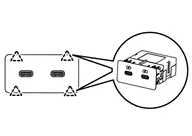
 |
: Pawl |
INSTALLATION
Note the following, and install in the reverse order of removal.
Align the cut outs of USB power socket and front center console rear finisher assembly.
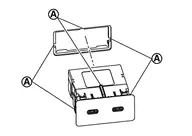
 |
: Cut out |
Usb Power Socket (second Rr)
Removal and Installation
REMOVAL
Remove rear center tray assembly. Refer to Removal and Installation.
Press the USB power socket fixing pawl from the back of the rear center console box to remove the USB power socket.
|
: Pawl |
INSTALLATION
Note the following, and install in the reverse order of removal.
Align the cut outs of USB power socket and rear center console box.
|
: Cut out |
Usb Power Socket (third)
Removal and Installation
REMOVAL
Remove luggage side lower finisher. Refer to Removal and Installation.
Press the USB power socket fixing pawl from the back of the luggage side lower finisher to remove the USB power socket.
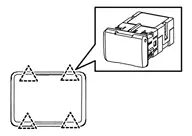
|
: Pawl |
INSTALLATION
Note the following, and install in the reverse order of removal.
Align the cut outs of USB power socket and luggage side lower finisher.
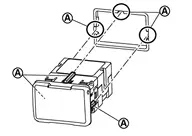
|
: Cut out |