A/C switch
Component Function Check
1.CHECK A/C ON SIGNAL With CONSULT-III
1. Turn ignition switch ON. 2. Select “AIR CONDITIONER” of “BCM” using CONSULT-III.
3. Select “AIR COND SW” in “DATA MONITOR” mode, and check status under the following condition.

Is the inspection result normal? YES >> INSPECTION END
NO >> Refer to HAC-281, "Diagnosis Procedure".
Diagnosis Procedure
1.CHECK A/C SWITCH POWER SUPPLY 1. Turn ignition switch OFF. 2. Disconnect A/C control connector. 3. Turn ignition switch ON.4. Check output waveform between A/C control harness connector and ground with using oscilloscope.
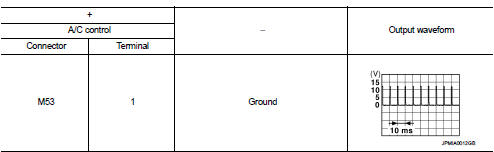
Is the inspection result normal? YES >> GO TO 2.
NO >> GO TO 3.
2.CHECK A/C SWITCH GROUND CIRCUIT FOR OPEN 1. Turn ignition switch OFF. 2. Disconnect BCM connector.3. Check continuity between A/C control harness connector and ground.

Is the inspection result normal? YES >> Replace A/C control. Refer to HAC-239, "Removal and Installation".
NO >> Repair harness or connector.
3.CHECK A/C SWITCH POWER SUPPLY CIRCUIT FOR OPEN 1. Turn ignition switch OFF. 2. Disconnect BCM connector.3. Check continuity between A/C control harness connector and BCM harness connector.

Is the inspection result normal? YES >> GO TO 4.
NO >> Repair harness or connector.
4.CHECK A/C SWITCH POWER SUPPLY CIRCUIT FOR SHORTCheck continuity between A/C control harness connector and ground.

Is the inspection result normal? YES >> Replace BCM. Refer to BCS-93, "Removal and Installation" (with Intelligent Key) or BCS-161, "Removal and Installation" (without Intelligent Key).
NO >> Repair harness or connector.