Basic inspection
)
ADDITIONAL SERVICE WHEN REPLACING CONTROL UNIT (BCM) : DescriptionBEFORE REPLACEMENT
When replacing BCM, save or print current vehicle specification with CONSULT-III configuration before replacement.
NOTE:
If “READ CONFIGURATION” can not be used, use the “WRITE CONFIGURATION - Manual selection” after replacing BCM.
AFTER REPLACEMENT
CAUTION:• When replacing BCM, you must perform “WRITE CONFIGURATION” with CONSULT-III. - Complete the procedure of “WRITE CONFIGURATION” in order. - If you set incorrect “WRITE CONFIGURATION”, incidents might occur. - Configuration is different for each vehicle model. Confirm configuration of each vehicle model.
• When replacing BCM, perform the system initialization (NATS).
ADDITIONAL SERVICE WHEN REPLACING CONTROL UNIT (BCM) : Special Repair Requirement 1.SAVING VEHICLE SPECIFICATION CONSULT-III Configuration
Perform “READ CONFIGURATION” to save or print current vehicle specification. Refer to BCS-80, "CONFIGURATION (BCM) : Description".
NOTE:
If “READ CONFIGURATION” can not be used, use the “WRITE CONFIGURATION - Manual selection” after replacing BCM.
>> GO TO 2.
2.REPLACE BCMReplace BCM. Refer to BCS-93, "Removal and Installation".
>> GO TO 3.
3.WRITING VEHICLE SPECIFICATION CONSULT-III Configuration
Perform “WRITE CONFIGURATION - Config file” or “WRITE CONFIGURATION - Manual selection” to write vehicle specification. Refer to BCS-81, "CONFIGURATION (BCM) : Special Repair Requirement".
>> GO TO 4.
4.INITIALIZE BCM (NATS)Perform BCM initialization. (NATS) >> WORK END
Configuration (BCM) CONFIGURATION (BCM) : DescriptionVehicle specification needs to be written with CONSULT-III because it is not written after replacing BCM.
Configuration has three functions as follows

CAUTION:
• When replacing BCM, you must perform “WRITE CONFIGURATION” with CONSULT-III. • Complete the procedure of “WRITE CONFIGURATION” in order. • If you set incorrect “WRITE CONFIGURATION”, incidents might occur. • Configuration is different for each vehicle model. Confirm configuration of each vehicle model.
• Never perform “WRITE CONFIGURATION” except for new BCM.
CONFIGURATION (BCM) : Special Repair Requirement 1.WRITING MODE SELECTION CONSULT-III Configuration
Select “CONFIGURATION” of BCM.
When writing saved data>>GO TO 2.
When writing manually>>GO TO 3.
2.PERFORM “WRITE CONFIGURATION - CONFIG FILE” CONSULT-III Configuration
Perform “WRITE CONFIGURATION - Config file”.
>> WORK END 3.PERFORM “WRITE CONFIGURATION - MANUAL SELECTION” CONSULT-III Configuration
1. Select "WRITE CONFIGURATION - Manual selection". 2. Identify the correct model and configuration list. Refer to BCS-81, "CONFIGURATION (BCM) : Configuration list".
3. Confirm and/or change setting value for each item.
CAUTION:Thoroughly read and understand the vehicle specification. Incorrect settings may result in abnormal control of ECU.
4. Select "SETTING".
CAUTION:Make sure to select “SETTING” even if the indicated configuration of brand new BCM is same as the desirable configuration. If not, configuration which is set automatically by selecting vehicle model can not be memorized.
5. When "COMMAND FINISHED", select "END".
>> GO TO 4.
4.OPERATION CHECKConfirm that each function controlled by BCM operates normally.
>> WORK END
CONFIGURATION (BCM) : Configuration list CAUTION:Thoroughly read and understand the vehicle specification. Incorrect settings may result in abnormal control of ECU.
2WD MODELS
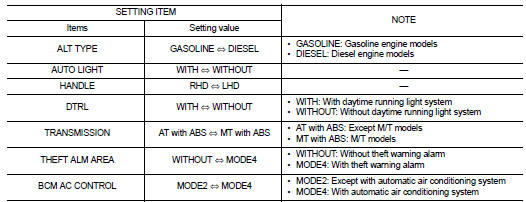
⇔: Items which confirm vehicle specifications 4WD MODELS
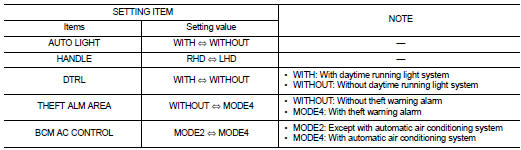
⇔: Items which confirm vehicle specifications