Diagnosis and repair work flow
OVERALL SEQUENCE
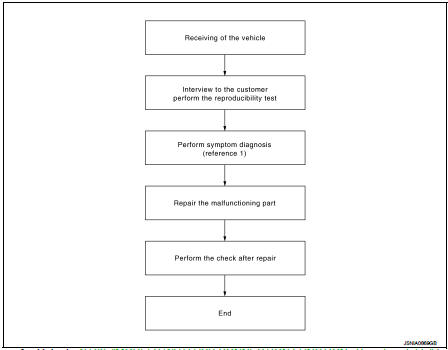
Reference 1··· Refer to AV-33, "MODELS WITH USB CONNECTION FUNCTION : Symptom Table" (with USB connection function) or AV-35, "MODELS WITHOUT USB CONNECTION FUNCTION : Symptom Table" (without USB connection function).
DETAILED FLOW
1.CHECK SYMPTOMCheck the malfunction symptoms by performing the following items.
• Interview the customer to obtain the malfunction information (conditions and environment when the malfunction occurred).• Check the symptom.
>> GO TO 2.
2.PERFORM DIAGNOSIS BY SYMPTOMPerform the relevant diagnosis referring to the diagnosis chart by symptom. Refer to AV-33, "MODELS WITH USB CONNECTION FUNCTION : Symptom Table" (with USB connection function) or AV-35, "MODELS WITHOUT USB CONNECTION FUNCTION : Symptom Table" (without USB connection function).
>> GO TO 3.
3.REPAIR OR REPLACE MALFUNCTIONING PARTSRepair or replace the malfunctioning parts.
>> GO TO 4.
4.FINAL CHECKPerform the operation to check that the malfunction symptom is solved or any other symptoms are present.
Is there any symptom? YES >> GO TO 2.
NO >> INSPECTION END