Instrument brightness control

You can easily customize the visibility of your display by pressing the "+" button to increase the brightness of the instrument panel lights, or by pressing the "-" button to decrease the intensity to a more comfortable level for your driving environment.
Turn signal switch
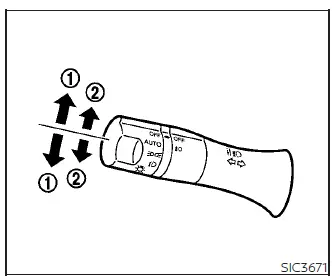
Turn signal
- Move the lever up or down until it reaches the latching position to signal your intention to turn. Once the maneuver is complete, the turn signal will cancel automatically.
Lane change signal
- For a manual lane change signal, move the lever up or down until the signal begins to flash without latching the lever, and hold it in place until your lane change is finished. Alternatively, for a quick lane change, move the lever until it flashes and release it; the turn signal will then automatically flash three times. Choose the signaling method that best suits the current traffic conditions for your Nissan Leaf.
Fog light switch
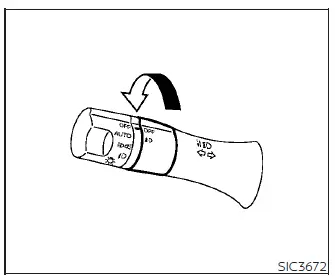
To activate the fog lights, first ensure the headlight switch is in the  position, then rotate the fog light ring to the
 position. To deactivate them, simply rotate the switch back to the OFF position. Please note that the headlights must be active for the fog lights to operate.
Emblem Light
The distinctive emblem light on your Nissan Leaf operates independently of the headlight switch. It illuminates automatically whenever the power switch is in the ON position and will turn off once the power switch is set to the OFF position.