System operation
The system provides both visual and audible feedback regarding rearward obstacles whenever the shift lever is placed into the R (Reverse) position.
Sonar Operation Table
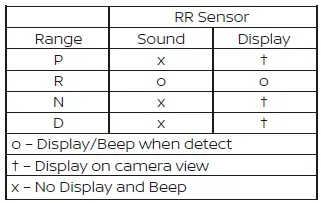
For safety and stability, the RSS is automatically deactivated when your speed exceeds 10 km/h and will reactivate once you drop below that threshold.
If an obstacle is detected exclusively by the corner sensors and you remain stationary, the intermittent tone will automatically cease after 3 seconds. The audible alert will also stop if you steer the Nissan Leaf away from the object or if the object itself moves out of the detection zone.
When an object enters the detection range, a green indicator appears and begins to blink in synchronization with an intermittent tone. As you move closer, the indicator shifts to yellow and the blinking frequency increases. Finally, when you are in very close proximity to the obstacle, the indicator turns red, the blinking stops, and the tone becomes a continuous warning.
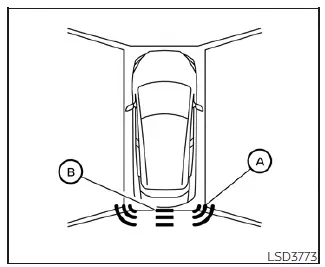
The system distinguishes between detection zones: indicator A illuminates when the corner of your Nissan Leaf approaches an object, while indicator B signifies that the center of the rear bumper is nearing an object.
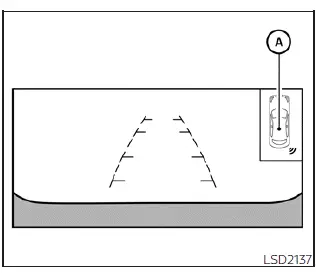
The system indicators labeled A will dynamically appear and update as you progressively move the vehicle closer to a detected object.