Monitor, climate, audio, phone and voice recognition systems
Adjusting the screen
In this manual: Monitor, climate, audio, phone and voice recognition systems
7steps
~42min
2/5difficulty
Done 0 of 7
- Press the MENU button.
- Touch the “Settings” key.
- Touch the “ > ” key to move to the next page.
- Touch the “Camera” key.
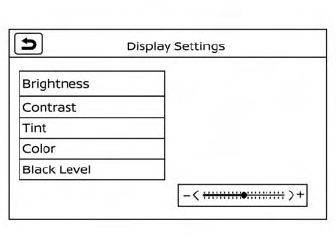
- Touch “Display settings” key.
- Touch the “Brightness,” “Contrast,” “Tint,” “Color,” or “Black Level” key.
- Adjust the item by touching the “ + ” or “ - ” key on the touch-screen display or by turning the Tune-Scroll knob
Was this page helpful?