Systèmes d'écran de bord, de climatisation, d'audio, de téléphone et de reconnaissance vocale
Réglage de l'écran
Dans ce manuel : Systèmes d'écran de bord, de climatisation, d'audio, de téléphone et de reconnaissance vocale
7étapes
~42min
2/5difficulté
Fait 0 sur 7
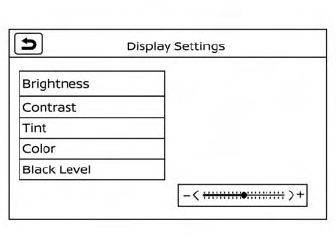
- Appuyez sur la touche MENU.
- Touchez la touche « Réglages ».
- Touchez la touche « > » pour passer à la page suivante.
- Touchez la touche « Caméra ».
- Touchez la touche « Réglages d'affichage ».
- Touchez la touche « Brightness », « Contrast », « Tint », « Color » ou « Black Level ».
- Réglez l'élément en touchant la touche « + » ou « - » sur l'écran tactile, ou en tournant le bouton Tune-Scroll
Cette page vous a-t-elle été utile ?