Starting and driving
Front and rear sonar system (if so equipped)
In this manual: Starting and driving
3steps
~18min
2/5difficulty
Done 0 of 3
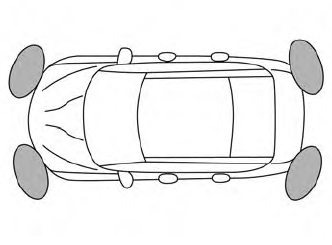
The sonar (parking sensor) system sounds a tone to inform the driver of obstacles near the bumper.
When the “DISPLAY” key is ON, the sonar view will automatically appear in the meter.
- The sonar (parking sensor) system is a convenience but it is not a substitute for proper parking.
- The driver is always responsible for safety during parking and other maneuvers. Always look around and check that it is safe to do so before parking.
- Read and understand the limitations of the sonar (parking sensor) system as contained in this section. The colors of the corner sonar indicator and the distance guide lines in the front/rear view indicate different distances to the object.
- Inclement weather or ultrasonic sources such as an automatic car wash, a truck’s compressed-air brakes or a pneumatic drill may affect the function of the system; this may include reduced performance or a false activation.
- This function is designed as an aid to the driver in detecting large stationary objects to help avoid damaging the vehicle.
- The system is not designed to prevent contact with small or moving objects. Always move slowly. The system will not detect small objects below the bumper, and may not detect objects close to the bumper or on the ground.
- The system may not detect the following objects: fluffy objects such as snow, cloth, cotton, glass, wool, etc., and thin objects such as rope, wire and chain, etc., or wedge-shaped objects.
If your vehicle sustains damage to the bumper fascia, leaving it misaligned or bent, the sensing zone may be altered causing inaccurate measurement of obstacles or false alarms.
- Excessive noise (such as audio system volume or an open vehicle window) will interfere with the tone and it may not be heard.
- Keep the sonar sensors (located on the bumper fascia) free fromsnow, ice and large accumulations of dirt. Do not clean the sensors with sharp objects. If the sensors are covered, the accuracy of the sonar function will be diminished.
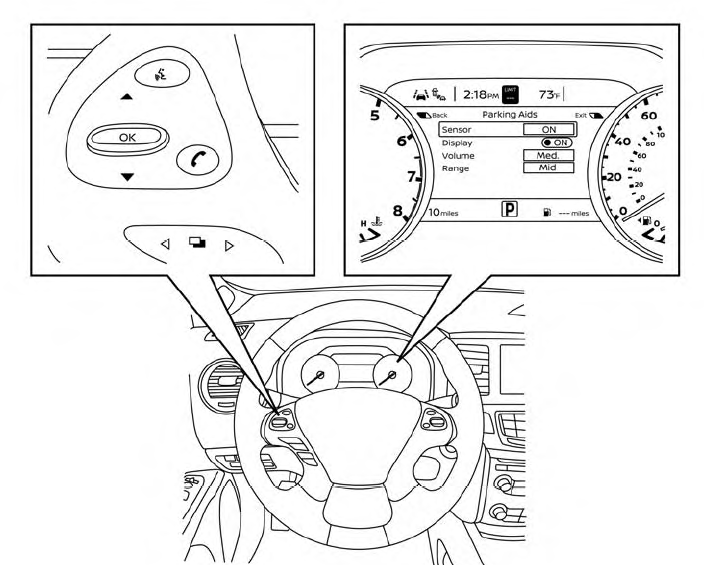
HOW TO ENABLE/DISABLE THE FRONT AND REAR SONAR SYSTEM
The system is automatically activated when the ignition is in the ON position and the shift lever is in the R (Reverse) position.
Perform the following steps to enable or disable the sonar system:
- Press the
 button until “Settings” appears in the vehicle information display and then press OK. Use the
 button to select “Driver Assistance.” Then press the OK button.
- Select “Parking Aids” and press the OK button.
- Select “Sensor” and press the OK button. Select “ON” and press the OK button.
Was this page helpful?