Intelligent Cruise Control (ICC) (if so equipped)
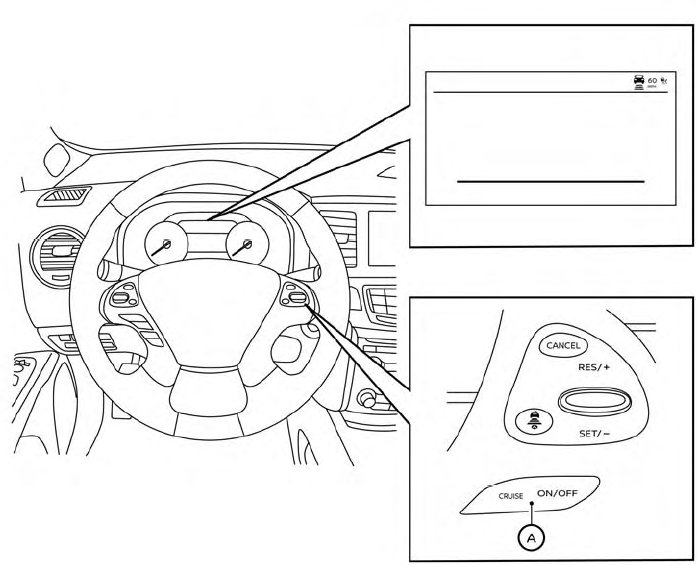
 CRUISE ON/OFF switch
- The ICC system is only an aid to assist the driver and is not a collision warning or avoidance device. It is the driver’s responsibility to stay alert, drive safely, and be in control of the vehicle at all times.
- Always observe posted speed limits and do not set the speed over them.
- Always drive carefully and attentively when using the ICC system. Read and understand the Owner’s Manual thoroughly before using the ICC system.
- To avoid serious injury or death, do not rely on the system to prevent accidents or to control the vehicle’s speed in emergency situations. Do not use the ICC system except in appropriate road and traffic conditions.
- In the conventional (fixed speed) cruise control mode, a warning chime will not sound to warn you if you are too close to the vehicle ahead. Pay special attention to the distance between your vehicle and the vehicle aheadof youor a collision could occur.
The ICC system maintains a selected distance fromthe vehicle in front of you within the speed range of 0 to 144 km/h up to the set speed. The set speed can be selected by the driver between 20 to 144 km/h.
The vehicle travels at a set speed when the road ahead is clear.
The ICC system can be set to one of two cruise control modes:
- Vehicle-to-vehicle distance control mode: For maintaining a selected distance between your vehicle and the vehicle in front of you up to the preset speed
- Conventional (fixed speed) cruise control mode: For cruising at a preset speed
Push the CRUISE ON/OFF switch  to choose the cruise control mode between the vehicle-to-vehicle distance control mode and the conventional (fixed speed) cruise control mode.
Once a control mode is activated, it cannot be changed to the other cruise control mode. To change the mode, push the CRUISE ON/OFF switch  once to turn the system off. Then push the CRUISE ON/OFF switch
 again to turn the system back on and select the desired cruise control mode.
Always confirm the setting in the ICC system display.
For the vehicle-to-vehicle distance control mode, refer to “Vehicle-to-vehicle distance control mode” in this section.
For the conventional (fixed speed) cruise control mode, refer to “Conventional (fixed speed) cruise control mode” in this section.