Trip computer
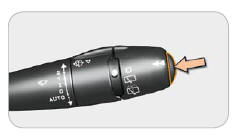
or
 TRIP (Trip):
access to the trip computer displays.
Each successive press of the button at the end of the wiper stalk displays different information.
 the "vehicle" tab
with:
- the range,
- the instantaneous fuel consumption,
- the distance remaining to travel.
 the trip "1" tab
with:
- the distance travelled,
- the average fuel consumption,
- the average speed, for the first trip.
 the trip "2" tab
with:
- the distance travelled,
- the average fuel consumption,
- the average speed, for the second trip.
Trips
Trips "1" and "2" are independent and operate in the same way.
Trip "1" can be used, for example, for daily calculations, and trip "2" for monthly calculations.
Resetting
When the desired trip is displayed, press and hold the control for more than two seconds.
 Range
(km or miles)
It shows the distance that can still be travelled with the fuel remaining in the tank, based on the average consumption over the most recent kilometres driven.
This figure may increase following a change in driving style or terrain, causing a significant drop in instantaneous fuel consumption.
As soon as the range is less than 30 km, four segments are displayed.
After refuelling, the range is displayed once it exceeds 100 km.
 If horizontal segments remain displayed instead of numbers while driving, consult your PEUGEOT dealer.
 Instantaneous
consumption (l/100 or km/l or mpg)
This is the average quantity of fuel consumed over the last few seconds.
This function is only displayed from 30 km/h.
 Distance remaining
to travel (km or miles)
This is the distance to the destination, either calculated at any time by the navigation system if guidance is active, or entered by the user, minus the kilometres travelled since it was entered.
By default, dashes are displayed instead of numbers.
 Average speed (km/h
or mph)
This is the average speed calculated since the last trip computer reset (ignition on).
 Average
consumption (l/100 or km/l or mpg)
This is the average quantity of fuel consumed since the trip computer was last reset.
 Distance travelled
(km or miles)
It shows the distance travelled since the trip computer was last reset.
Access via the main menu
"TRIP" menu (Trip)
Press the "MENU" button to access the main menu.
Select the "Trip computer" or "Vehicle diagnostics" application using the navigator, then confirm or press the "MODE" button until the trip computer screen is displayed, then confirm with "OK".
The "Trip computer" or "Vehicle diagnostics" menu offers the following choices:
- Warning log,
- Function status,
- Entering the distance to be travelled.
Alert log
It lists the active warning messages, displaying them one after another on the multifunction screen.
Function status
It lists the active or inactive status of the functions fitted to the vehicle.
Distance remaining to be travelled (km or miles)
When guidance is not active, it allows an approximate distance to be travelled to be entered.
Test yourself
A quick Peugeot 407 quiz: every answer comes with an explanation and a link to the manual page.