XR25 sheet
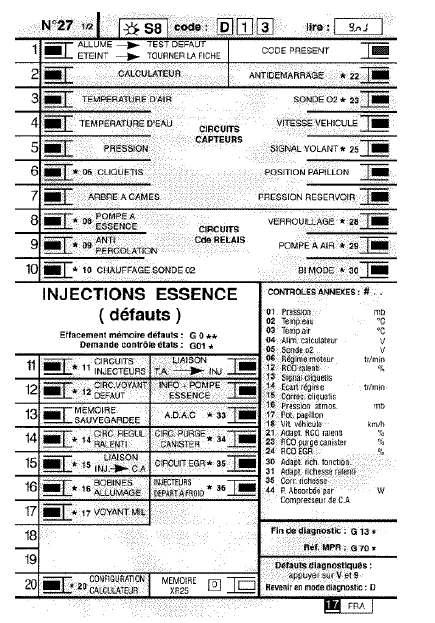
PRESENTATION OF XR25 SHEET No. 27, PAGE 1/2
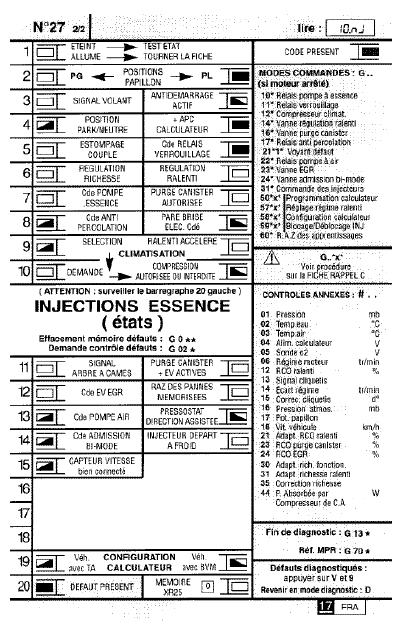
PRESENTATION OF XR25 SHEET No. 27, PAGE 2/2
BAR GRAPH OVERVIEW

Lights up when communication is established with the product's ECU. If it stays off:
the code does not exist,
there is a fault in the line, the tool or the ECU.
FAULT OVERVIEW (always on a coloured background)
 If lit, it signals a fault on the diagnosed product; the associated text defines the fault.
 If off, it signals that no fault has been detected on the diagnosed product.
STATUS OVERVIEW (always on a white background)
Engine stopped, ignition on, no operator action
The status bar graphs on the sheet are shown in the state they must be in with the engine stopped, ignition on, and no operator action.
If the bar graph is shown on the sheet as
 the tool must display as information
If the bar graph is shown on the sheet as
 the tool must display as information

If the bar graph is shown on the sheet as
 the tool must display as information eitheror

Engine running
Off when the function or condition specified on the sheet is no longer met.
On when the function or condition specified on the sheet is met.
Sheet No. 27 is a generic sheet used for several engines.
Not all engines use the same bar graphs. To find out which bar graphs are handled by the injection ECU, after entering communication, press the V and 9 keys simultaneously.
The bar graphs handled will light up:
steady, if they are non-storable fault bar graphs, or, if they are status bar graphs,
flashing, if they are storable fault bar graphs.
To return to diagnostic mode, press the D key.
Test yourself
A quick Renault Kangoo quiz: every answer comes with an explanation and a link to the manual page.