Audio
How to play back
In this manual: Audio
~1min read
1. Connect a USB storage device/iPod®.
2. Press the  button. Each time you briefly press the button, the mode changes in the following sequence.
Type C audio:
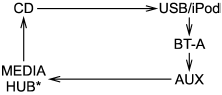
*: Only when a Media Hub is connected.
Type D audio:
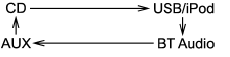
When the USB/iPod® mode is selected, the player will start playback of the USB storage device/iPod®.
- Do not disconnect the connector from an iPod® during iPod® operation.
Test yourself
A quick Subaru Forester quiz: every answer comes with an explanation and a link to the manual page.
Was this page helpful?