Audio
Selecting category (only when connecting iPod®)
In this manual: Audio
~1min read
When the  button is pressed for less than 1.5 seconds, the iPod® menu is displayed.
Each time you turn the “TUNE/TRACK/ CH” dial clockwise, the displayed category changes in the following sequence. Each time you turn the dial counterclockwise, the displayed category changes in the opposite sequence.
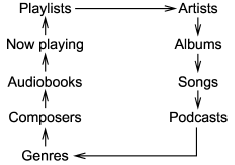
To select the category, press the dial. To close the iPod® menu, press the button for more than 1.5 seconds. To return to the previous screen, briefly press the button.
Test yourself
A quick Subaru Forester quiz: every answer comes with an explanation and a link to the manual page.
Was this page helpful?