Rear Power Outlet Socket
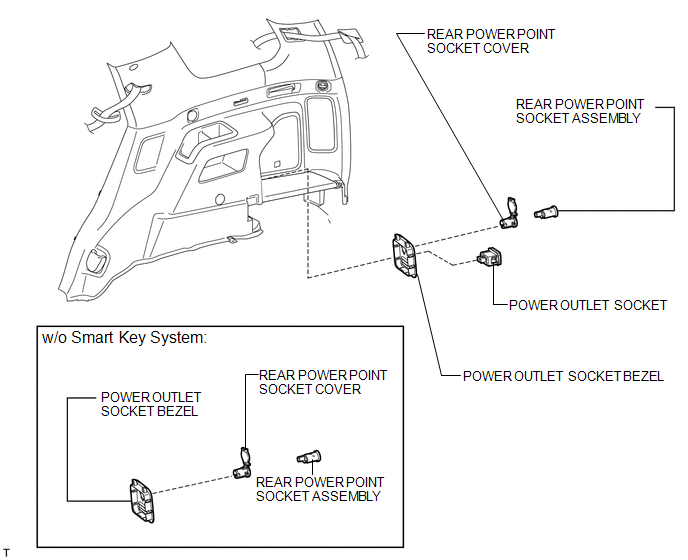
Removal REMOVAL PROCEDURE
1. REMOVE POWER OUTLET SOCKET BEZEL (w/o Smart Key System)
(a) Put protective tape around the power outlet socket bezel. Text in Illustration
|
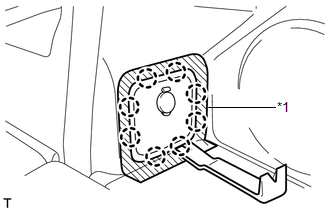 |
(b) Using a moulding remover, detach the 8 claws and remove the bezel.
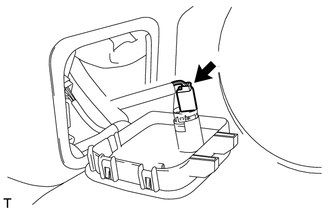
(c) Disconnect the connector. |
 |
2. REMOVE REAR POWER POINT SOCKET ASSEMBLY (w/o Smart Key System)
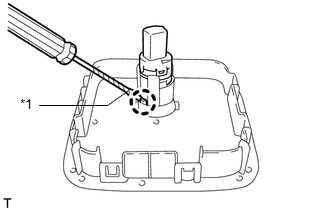
(a) Using a screwdriver, detach the claw and remove the power point socket. HINT: Tape the screwdriver tip before use. Text in Illustration
|
 |
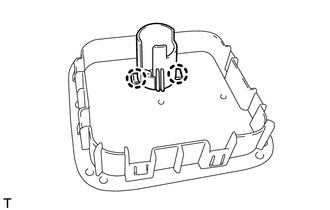
3. REMOVE REAR POWER POINT SOCKET COVER (w/o Smart Key System)
(a) Detach the 2 claws and remove the socket cover. |
 |
4. REMOVE POWER OUTLET SOCKET BEZEL (w/ Smart Key System)
(a) Put protective tape around the power outlet socket bezel. Text in Illustration
|
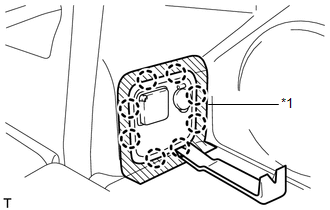 |
(b) Using a moulding remover, detach the 8 claws and remove the bezel.
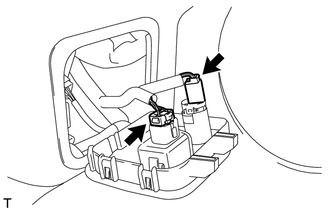
(c) Disconnect the 2 connectors. |
 |
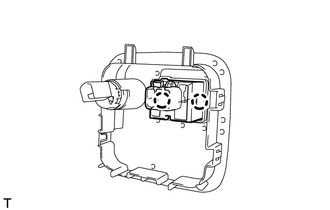
5. REMOVE POWER OUTLET SOCKET (w/ Smart Key System)
(a) Detach the 2 claws and remove the socket. |
 |
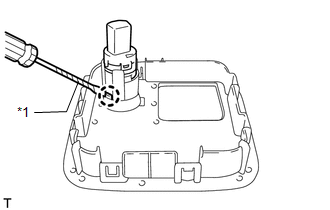
6. REMOVE REAR POWER POINT SOCKET ASSEMBLY (w/ Smart Key System)
(a) Using a screwdriver, detach the claw and remove the power point socket. HINT: Tape the screwdriver tip before use. Text in Illustration
|
 |
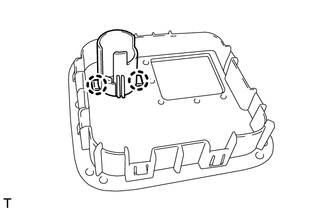
7. REMOVE REAR POWER POINT SOCKET COVER (w/ Smart Key System)
(a) Detach the 2 claws and remove the socket cover. |
 |
1. INSTALL REAR POWER POINT SOCKET COVER (w/o Smart Key System)
(a) Attach the 2 claws to install the socket cover.
2. INSTALL REAR POWER POINT SOCKET ASSEMBLY (w/ Smart Key System)
(a) Attach the claw to install the power point socket.
3. INSTALL POWER OUTLET SOCKET (w/ Smart Key System)
(a) Attach the 2 claws to install the socket.
4. INSTALL POWER OUTLET SOCKET BEZEL (w/ Smart Key System)
(a) Connect the 2 connectors.
(b) Attach the 8 claws to install the bezel.
5. INSTALL REAR POWER POINT SOCKET ASSEMBLY (w/o Smart Key System)
(a) Attach the claw to install the power point socket.
6. INSTALL POWER OUTLET SOCKET BEZEL (w/o Smart Key System)
(a) Connect the connector.
(b) Attach the 8 claws to install the bezel.
7. INSTALL REAR POWER POINT SOCKET COVER (w/ Smart Key System)
(a) Attach the 2 claws to install the socket cover.
Test yourself
A quick Toyota 4Runner quiz: every answer comes with an explanation and a link to the manual page.