Network Gateway ECU
Components
COMPONENTS
ILLUSTRATION
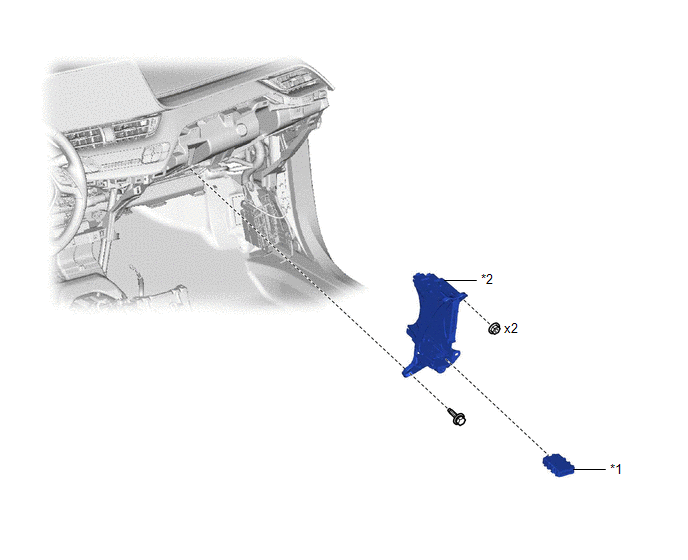
*1 |
CENTRAL GATEWAY ECU (NETWORK GATEWAY ECU) |
*2 |
RH ECU INTEGRATION BOX |
Installation
INSTALLATION
PRECAUTION / NOTICE / HINT
PROCEDURE
1. INSTALL CENTRAL GATEWAY ECU (NETWORK GATEWAY ECU)
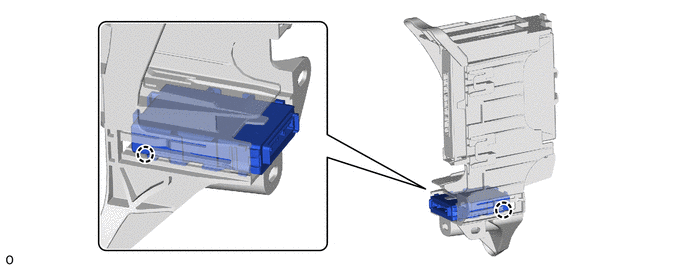
(a) Engage the claws to install the central gateway ECU (network gateway ECU).
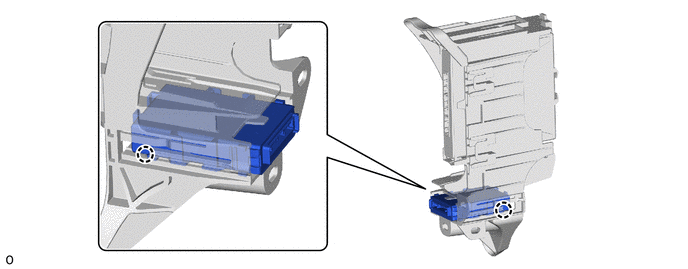
NOTICE:
Make sure that the central gateway ECU (network gateway ECU) is installed correctly.
2. INSTALL RH ECU INTEGRATION BOX
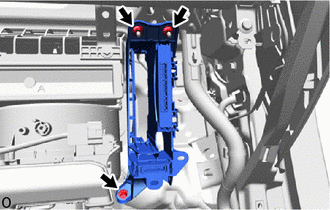
(a) Install the RH ECU integration box with the 2 nuts and the bolt.
(b) Install the wire harness clamp. |
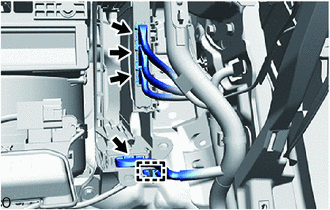 |
(c) Connect the 4 connectors.
3. INSTALL INSTRUMENT PANEL LOWER FINISH PANEL NO. 2
Click here
Removal
REMOVAL
PROCEDURE
1. REMOVE INSTRUMENT PANEL LOWER FINISH PANEL NO. 2
Click here
2. REMOVE RH ECU INTEGRATION BOX
(a) Disconnect the 4 connectors. |
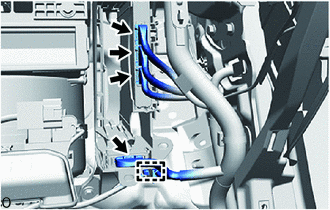 |
(b) Using a clip remover, release the wire harness clamp.
(c) Remove the bolt, the 2 nuts and the RH ECU integration box. |
 |
3. REMOVE CENTRAL GATEWAY ECU (NETWORK GATEWAY ECU)
(a) Release the claws to remove the central gateway ECU (network gateway ECU).
NOTICE:
- If the right integration ECU box is deformed or damaged, replace it.
- Take care not to bend the claws more than necessary.