Toyota C-HR
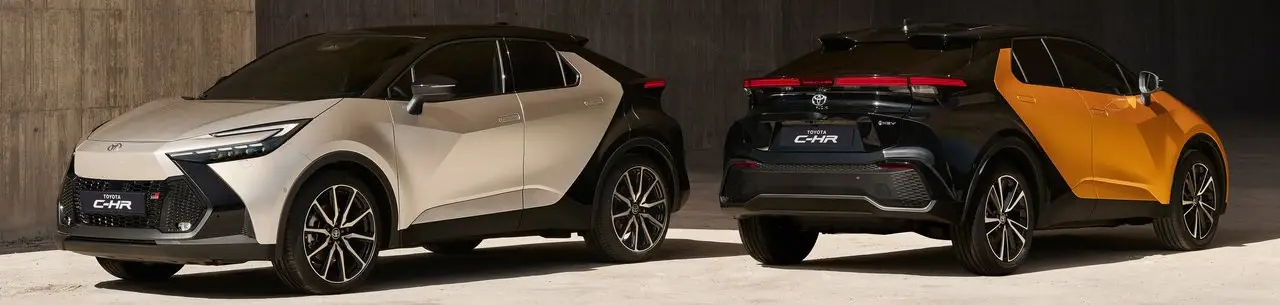
The Toyota C-HR (AX20) 2023-2025 is a modern and stylish compact SUV that combines advanced features, efficiency, and a dynamic driving experience. Designed with both urban environments and longer journeys in mind, the C-HR offers a combination of practicality and cutting-edge technology. Whether you're commuting through city streets or taking a weekend road trip, the C-HR is built to deliver a comfortable and efficient ride. Explore its innovative safety features, intuitive infotainment system, and sleek design with the help of our comprehensive owner's manual.
Toyota C-HR Owner's Manual: Your Guide to Vehicle Operation
Our detailed Toyota C-HR Owner's Manual provides all the essential information for understanding and maintaining your vehicle. From safety guidelines to everyday operational features, this guide ensures you're fully equipped to handle your C-HR with ease. Learn how to operate key features like the hybrid system, utilize the driving assistance systems, and perform basic maintenance tasks to keep your car in top condition. Whether you're a new owner or experienced driver, this manual is designed to make every drive more enjoyable and convenient.
For your information
The "For Your Information" section of the owner's manual provides important details, including the Main Owner's Manual for comprehensive guidance on your Toyota C-HR's functions, maintenance, and safety features. It also covers the Event Data Recorder, which records key vehicle data during specific driving events to assist with incident analysis and vehicle diagnostics.
Pictorial index
Visuals of the exterior, instrument panel, switches, and interior for both left-hand and right-hand drive vehicles, helping you easily identify key features and components.
For safety and security
For safety and security, the Toyota C-HR includes features designed to protect both the driver and passengers. It covers safe use guidelines, child safety systems, emergency assistance procedures, hybrid system details for performance and safety, and a theft deterrent system to ensure the vehicle’s protection.
Vehicle status information and indicators
Vehicle status information and indicators help you monitor your Toyota C-HR’s condition and ensure safe driving. This section covers essential warning lights and indicators, along with details on the gauges and meters available on both the 7-inch and 12.3-inch displays. You’ll also find information on the multi-information display, providing key data in a user-friendly layout, and the head-up display, which projects important information directly onto the windshield. Additionally, the energy monitor and consumption screen help you track fuel efficiency and energy usage in hybrid models.
Before driving
Before driving your Toyota C-HR, it's important to familiarize yourself with key information for a smooth and safe driving experience. This section covers essential topics such as key information, opening, closing, and locking the doors, adjusting the seats, and configuring the steering wheel and mirrors for optimal comfort. It also includes instructions for opening and closing the windows and personalizing your driving experience with favorite settings to make each journey more convenient.
Driving
Driving your Toyota C-HR is made easier and more enjoyable with the right knowledge of its systems and features. This section covers essential steps like preparing for driving, including before driving and driving procedures, along with operating the lights and wipers for clear visibility. It also includes guidance on refueling your vehicle, using the driving support systems for enhanced safety, and practical driving tips to improve fuel efficiency and performance.
Interior features
The interior features of your Toyota C-HR are designed to enhance comfort and convenience during your drive. This section covers essential functions such as using the air conditioning system and defogger to maintain a comfortable climate, as well as operating the interior lights for better visibility. It also provides instructions on utilizing the vehicle’s storage features to keep your belongings organized and accessible. Additionally, the section highlights other interior features, ensuring a comfortable and functional cabin for both the driver and passengers.
Maintenance and care
Proper maintenance and care are essential to keep your Toyota C-HR in top condition. This section covers cleaning and protecting both the vehicle exterior and interior, as well as maintenance requirements and important precautions for do-it-yourself services. It includes guidance on checking the engine compartment, using a floor jack, maintaining the 12-volt battery, tires, and wheels, and servicing the air conditioning filter. Additional topics like cleaning the hybrid battery air intake vent, replacing the electronic key battery, and checking light bulbs and fuses ensure your vehicle stays reliable and safe.
When trouble arises
When trouble arises, it's important to know how to respond quickly and effectively. This section covers essential information for dealing with unexpected situations, including the steps to take in an emergency. From knowing what to do when a warning light appears to handling situations like flat tires or breakdowns, these guidelines help ensure your safety and the proper handling of your Toyota C-HR during difficult moments.
Vehicle specifications
The "Vehicle Specifications" section provides detailed information about your Toyota C-HR’s key features and technical details. This includes specifications related to performance, dimensions, and engine options, giving you a complete overview of what your vehicle offers. Additionally, it covers customization options available for your vehicle, allowing you to personalize features such as exterior styling, interior configurations, and more to suit your preferences.
About this manual
Toyota C-HR: 3 manuals with 2788 pages of instructions on operation, maintenance and repair. Everything is free to read, no sign-up required.
Most covered topics: safety (29), wheels and tires (16), brakes (7), engine (5), fuel and refueling (4).
This manual is available in: Русский, English, Français, Deutsch, Italiano, Español.
Toyota C-HR (AX20) 2023-2026 Owner's Manual
Toyota C-HR (AX20) 2023-2026 Owner's Manual The Toyota C-HR (AX20) 2023-2025 is a modern and stylish compact SUV that combines advanced features, efficiency, and a dynamic driving experience. Designed · 229 pages
- Main Owner's Manual
- Event data recorder
- Exterior
- Instrument panel (left-hand drive vehicles)
- Switches (left-hand drive vehicles)
- Interior (left-hand drive vehicles)
- Instrument panel (right-hand drive vehicles)
- Switches (right-hand drive vehicles)
- Interior (right-hand drive vehicles)
- For safe use
- Before driving
- For safe driving
- Seat belts
- Correct use of the seat belts
- SRS airbags
- Exhaust gas precautions
- Child safety
- Airbag manual on-off system
- Riding with children
- Child restraint systems
- Child restraint system compatibility for each seating position
- Child restraint system installation method
- Child restraint system fixed with an ISOFIX lower anchorage
- Emergency assistance
- Hybrid system
- Hybrid system features
- Acoustic vehicle alerting system
- Hybrid system precautions
- Hybrid battery (traction battery) air intake vent
- Theft deterrent system
- Immobilizer system
- Double locking system
- Alarm
- Warning lights and indicators
- Warning lights
- Indicators
- Gauges and meters (7-inch display)
- Meter display
- Adjusting the clock
- Gauges and meters (12.3-inch display)
- Meter display
- Adjusting the clock
- Multi-information display(7-inch display)
- Display contents
- Changing the meter display
- Driving support system information display
- Settings display
- Multi-information display(12.3-inch display)
- Display contents
- Changing the meter display
- Fuel Economy
- EV drive time ratio
- Settings display
- Head-up display
- System components
- Using the head-up display
- Pop-up display
- Energy monitor/consumption screen
- Key information
- Keys
- Digital key
- Opening, closing and lockingthe doors
- Side doors
- Unlocking and locking the doors from the inside
- Back door
- Unlocking and locking the back door from the outside
- Opening/closing the back door (vehicles with power back door)
- Changing settings of the power back door system (vehicles with power back door)
- Smart entry & start system
- Adjusting the seats
- Front seats
- Rear seats
- Head restraints
- Adjusting the steering wheeland mirrors
- Steering wheel
- Inside rear view mirror
- Digital Rear-view Mirror
- Adjusting the mirror
- Cleaning the Digital Rear-view Mirror
- Outside rear view mirrors
- Opening and closing the windows
- Favorite settings
- Driving position memory
- Registering/canceling/recalling a driving position to an electronic key (memory recall function)
- My Settings
- Before driving
- Driving the vehicle
- Cargo and luggage
- Trailer towing
- Driving procedures
- Power (ignition) switch
- EV drive mode
- Transmission
- Turn signal lever
- Parking brake
- Brake Hold
- Operating the lights and wipers
- Headlight switch
- AHS (Adaptive High-beam System)
- AHB (Automatic High Beam)
- Fog light switch
- Windshield wipers and washer
- Refueling
- Using the driving supportsystems
- Toyota Safety Sense software update
- Toyota Safety Sense
- Sensors used by Toyota Safety Sense
- Situations in which the sensors may not operate properly
- Driver monitor
- PCS (Pre-Collision System)
- Operating conditions of each function of the pre-collision system
- Situations in which the system may not operate properly
- LTA (Lane Tracing Assist)
- Enabling/disabling the system
- LCA (Lane Change Assist)
- Operating the LCA
- LDA (Lane Departure Alert)
- Changing LDA settings
- PDA (Proactive driving assist)
- FCTA (Front crossing traffic alert)
- RSA (Road Sign Assist)
- Types of road signs supported
- Dynamic radar cruise control
- Using the dynamic radar cruise control
- Approach warning
- Cruise control
- Speed limiter
- Emergency Driving Stop System
- BSM (Blind Spot Monitor)
- Blind Spot Monitor operation
- Automatic Rear Flashing Hazard Lights
- Secondary Collision Brake (Rear Impacts while Stopped)
- Safe Exit Assist
- Safe exit assist operation
- Toyota parking assist-sensor
- Sensor detection display, object distance
- Toyota parking assist-sensor object warning function (vehicles with Advanced Park)
- RCTA (Rear Crossing Traffic Alert) function
- RCTA function
- RCD (Rear Camera Detection)
- When a pedestrian is detected
- PKSB (Parking Support Brake)
- System overview
- Parking Support Brake function (static objects front and rear of the vehicle/static objects around the vehicle)
- Types of sensors
- Parking Support Brake function (moving vehicles rear of the vehicle)
- Parking Support Brake function (pedestrians rear of the vehicle)
- Toyota Teammate Advanced Park
- Types of cameras and sensors used for the Advanced Park
- Advanced Park guidance screens
- Perpendicular parking (forward/reverse) function
- Advanced Park perpendicular exiting (forward/reverse) function
- Advanced Park Parallel parking function
- Advanced Park parallel exiting function
- Advanced Park memory function
- Remote control function (if equipped)
- Advanced Park cancelation/ suspension
- Changing the Advanced Park settings
- Driving mode select switch
- GPF (Gasoline Particulate Filter) system
- Driving assist systems
- Driving tips
- Hybrid electric vehicle driving tips
- Winter driving tips
- Selecting tire chains
- Using the air conditioningsystem and defogger
- Automatic air conditioning system
- Air outlet layout and operations
- Heated steering wheel/seat heaters
- Using the interior lights
- Using the storage features
- List of storage features
- Luggage compartment features
- Other interior features
- Power outlet
- USB Type-C charging port
- Wireless charger
- Sun visors
- Cleaning and protecting the vehicle exterior
- Cleaning and protecting the vehicle interior
- Maintenance requirements
- Do-it-yourself service precautions
- Hood
- Positioning a floor jack
- Engine compartment
- Components
- Checking the engine oil
- Adding engine oil
- Checking the coolant
- 12-volt battery (2ZR-FXE engine)
- 12-volt battery (M20A-FXS engine)
- Tires
- Checking tires
- Tire rotation
- Installing tire pressure warning valves and transmitters
- Registering ID codes
- Selecting wheel set
- Tire inflation pressure
- Wheels
- Air conditioning filter
- Cleaning the hybrid battery (traction battery) air intake vent
- Electronic key battery
- Checking and replacing fuses
- Light bulbs
- Essential information
- Emergency flashers
- If your vehicle has to be stopped in an emergency
- If the vehicle is submerged or water on the road is rising
- Steps to take in an emergency
- If your vehicle needs to be towed
- Emergency towing procedure
- If you think something is wrong
- If a warning light turns on or a warning buzzer sounds
- If a warning message is displayed
- If you have a flat tire (vehicles with an emergency tire puncture repair kit)
- Location of the emergency tire puncture repair kit and tools
- Taking out the emergency tire puncture repair kit
- If you have a flat tire (vehicles with a spare tire)
- Installing the spare tire
- If the hybrid system will not start
- If the electronic key does not operate properly
- If the 12-volt battery is discharged
- If your vehicle overheats
- If the vehicle becomes stuck
- Specifications
- Maintenance data (fuel, oil level, etc.)
- Fuel information
- Customization
Toyota CH-R Owner's Manual
Toyota CH-R Owner's Manual · 188 pages
- Illustrated Index
- Road safety and theft prevention 3
- Instrument cluster 3
- Using each feature 5
- Driving 6
- Audio system 10
- Maintenance and care 3
- If problems arise 2
- Vehicle specifications 3
- Displayed information
- Trip information
- Settings display
- Using the air conditioning system and defogger 3
- Using the interior lights
- Using the storage compartments 1
- Using the Other Interior Equipment
Toyota CH-R Service Manual
Toyota CH-R Service Manual Parking Assist / Monitor System Audio / Video Mobile Communication Navigation / Multi-Information Display Steering Column Steering Gear / Linkage Power Steering Systems Horn · 2371 pages
- Parking Assist / Monitor System 5
- Audio / Video 11
- Mobile Communication 9
- Navigation / Multi-Display 4
- Steering Column 7
- Steering Gear / Steering Linkage 1
- Power Steering Assist Systems 2
- Horn 3
- Exterior Lighting 32
- Wiper / Washer 12
- Exterior Panels / Trim 22
- Doors / Back Door 13
- Mirrors (Outer) 6
- Windows 12
- Brake Control / Dynamic Control Systems 7
- Parking Brake 6
- Brakes (Rear) 4
- Brakes (Front) 3
- Brake System (Other) 8
- Maintenance 28
- Introduction 5
- Preventive Action 2
- Theft Deterrent / Keyless Entry 16
- Seat Belt 12
- Heater / Air Conditioning 28
- Meters / Gauges / Display 5
- Interior Light 16
- Interior Panels / Trim 3
- Power Outlets (Interior) 1
- Inside Rear View Mirror (Interior) 1
- Seats 9
- Supplemental Restraint Systems 19
- Door Lock 16
- 3zr-fae Battery / Charging 3
- Electrical Distribution 2
- Network Operation 3
- Alignment / Handling Diagnostics 1
- Tire Pressure Monitoring 1
- Alignment / Handling Diagnostics 1
- Tire Pressure Monitoring 2
- Tires / Wheels 2
- Rear Suspension 8
- Front Suspension 6
- Drive Shaft 2
- Axle and Differential 7
- K114 Continuously Variable Transmission 14