Before driving
Doors
In this manual: Before driving
~1min read
The vehicle can be locked and unlocked using the entry function, wireless remote control, key or door lock switch.
Entry function (vehicles with a smart key system) Wireless remote control (if equipped) KeyTurning the key operates the doors as follows:
Vehicles without a smart key system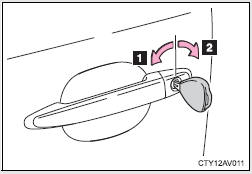 Vehicles without a smart key system
1 Locks all the doors 2 Unlocks all the doors
Driver’s side only: Turning the key unlocks the driver's door.
Turning the key again unlocks the other doors.
Vehicles with a smart key systemThe doors can also be locked and unlocked with the mechanical key.
Door lock switch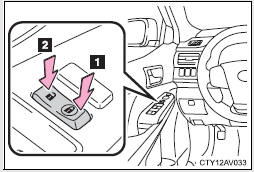 Door lock switch
1 Locks all the doors 2 Unlocks all the doors
Inside lock button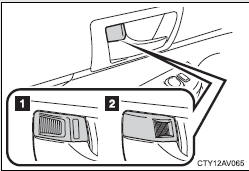 Inside lock button
1 Unlocks the door
2 Locks the door
The front doors can be opened by pulling the inside handle even if the lock buttons are in the lock position.
Test yourself
A quick Toyota Camry quiz: every answer comes with an explanation and a link to the manual page.
Was this page helpful?