Before driving
Wireless remote control
In this manual: Before driving
~1min read
The wireless remote control can be used to lock and unlock the vehicle.
Vehicles without a smart key system (type A) Vehicles without a smart key system (type A) 1 Locks all the doors 2 Sounds the alarm (press and hold) 3 Unlocks all the doors
Pressing the button unlocks the driver’s door. Pressing the button again within 5 seconds unlocks the other doors.
4 Opens the driver’s window and moon roof (press and hold)* 5 Unlocks the trunk (press and hold) *: This setting must be customized at your Toyota dealer.
Vehicles without a smart key system (type B) Vehicles without a smart key system (type B) 1 Locks all the doors 2 Unlocks all the doors
Pressing the button unlocks the driver’s door. Pressing the button again within 5 seconds unlocks the other doors.
3 Opens the driver’s window and moon roof (press and hold)* 4 Sounds the alarm (press and hold) 5 Unlocks the trunk (press and hold) *: This setting must be customized at your Toyota dealer.
Vehicles with a smart key system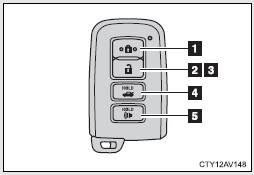 Vehicles with a smart key system 1 Locks all the doors 2 Unlocks all the doors
Pressing the button unlocks the driver’s door. Pressing the button again within 5 seconds unlocks the other doors.
3 Opens the driver’s window and moon roof (press and hold)* 4 Unlocks the trunk (press and hold) 5 Sounds the alarm (press and hold) *: This setting must be customized at your Toyota dealer.
Test yourself
A quick Toyota Camry quiz: every answer comes with an explanation and a link to the manual page.
Was this page helpful?