Interior features
Selecting a play mode
In this manual: Interior features
6steps
~36min
2/5difficulty
Done 0 of 6
- Press
 (BROWSE) to select iPod menu mode.
- Turning
 clockwise changes the play mode in the following order:
“Playlists”→“Artists”→“Albums”→“Songs”→“Podcasts”→“Genres” →“Composers”→“Audiobooks” - Press to select the desired play mode.
Press
 (PLAY) to enter the displayed selection.
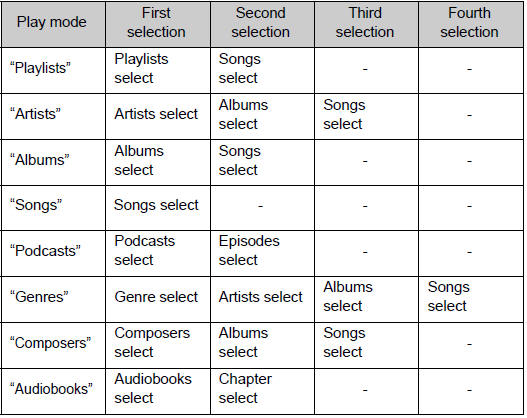
- Turn
 to display the first selection list.
- Press to select the desired item.
Pressing the knob changes to the second selection list.
- Repeat the same procedure to select the desired item.
To return to the previous selection list, press
 (
 ).
Test yourself
A quick Toyota Camry quiz: every answer comes with an explanation and a link to the manual page.
Was this page helpful?