Vehicle status information and indicators
Changing the meter display
In this manual: Vehicle status information and indicators
3steps
~18min
2/5difficulty
Done 0 of 3
The multi-information display is operated using the meter control switches.
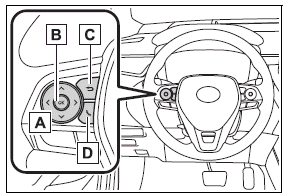
 : Select menu icons
 : Change displayed content, scroll up/down the screen and move the cursor up/down
- Press: Enter/Set
Press and hold: Reset/Display customizable items - Return to the previous screen
Call sending/receiving and history display
Linked with the hands-free system, sending or receiving call is displayed.
For details regarding the hands-free system, refer to the "MULTIMEDIA OWNER'S MANUAL".
Was this page helpful?