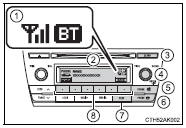
1 Bluetooth® connection status If “BT” is not displayed, the Bluetooth® audio/phone cannot be used. 2 Display A message, name, number, etc. is displayed. Lower-case characters and special characters cannot be displayed.
3 Displays the set up menu 4 Selects items such as menu and number Turn: Selects an item Press: Inputs the selected item 5 Off-hook switch Turns the hands-free system on/starts a call 6 On-hook switch Turns the hands-free system off/ends a call/refuses a call 7 Displays information that is too long to be displayed at one time on the display (press and hold) 8 Selects speed dials
?
Test yourself
A quick Toyota Corolla quiz: every answer comes with an explanation and a link to the manual page.