Using the audio system
1 Displays the current mode 2 Changes the following setting • Sound quality and volume balance
The sound quality and balance setting can be changed to produce the best sound.
• Automatic Sound Levelizer on/ off
3 Selects a mode
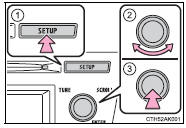
1 Press  .
2 Turn  to select “Sound Setting”.
3 Press  .
4 Turn  to select the desired mode.
“BASS”, “TREBLE”, “FADER”, “BALANCE”, or “ASL” 5 Press  .
Turning  adjusts the level.
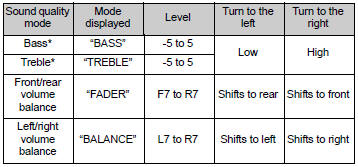
*:The sound quality level is adjusted individually in each audio mode.
■ Adjusting the Automatic Sound Levelizer (ASL)When ASL is selected, turning  to the right changes the amount of ASL in the order of “LOW”, “MID” and “HIGH”.
Turning  to the left turns ASL off.
ASL automatically adjusts the volume and tone quality according to the vehicle speed.
Test yourself
A quick Toyota Corolla quiz: every answer comes with an explanation and a link to the manual page.