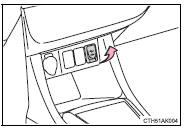
Connect an iPod, USB memory device or portable audio player to the AUX port/USB port as indicated below. Press to select “iPod”, “USB” or “AUX”.Connecting using the AUX port/USB port ■ iPod
Open the cover and connect an iPod using an iPod cable.
Turn on the power of the iPod if it is not turned on.
■ USB memory
Open the cover and connect a USB memory device.
Turn on the power of the USB memory device if it is not turned on.
■ Portable audio player
Open the cover and connect a portable audio player.
Turn on the power of the portable audio player if it is not turned on.
CAUTION■While driving
Do not connect a device or operate the device controls.
?
Test yourself
A quick Toyota Corolla quiz: every answer comes with an explanation and a link to the manual page.
 to select “iPod”, “USB” or “AUX”. Connecting using the AUX port/USB port ■ iPod