Interior features
Connecting a Bluetooth® device
In this manual: Interior features
~1min read
Up to 5 Bluetooth® devices (Phones (HFP) and audio players (AVP)) can be registered.
If more than 1 Bluetooth® device has been registered, select which device to connect to. 1 Press the “SETUP” button.2 Select “Bluetooth*”.
*: Bluetooth is a registered trademark of Bluetooth SIG, Inc.
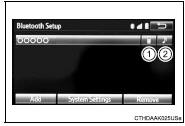
3 Select the device to be connected.
Supported profile icons will be displayed.
1 Phone
2 Audio player
Supported profile icons for currently connected devices will illuminate.
Dimmed icons can be selected to connect to the function directly.
Test yourself
A quick Toyota Corolla quiz: every answer comes with an explanation and a link to the manual page.
Was this page helpful?